
Group 3 Figure: Rotation Construction in 3D Vector Geometry
Loading the math board and drawing, please wait…
In collections
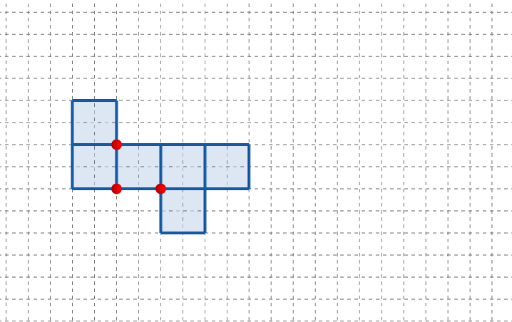
長方體有多少個摺紙圖樣?
This example demonstrates how rotating geometric objects in 3D space can reveal a structured relationship among points, line segments, and polygonal shapes, with optional parameter-driven behavior that connects to power functions. The key math ideas include geometric construction (points and polygons), vector interpretation in three dimensions, straight-line/segment relationships, and using power functions to model how certain quantities change. Construction overview in GeoGebra: Point is used to define key vertices (e.g., A, B, C and multiple parameter-dependent points such as q1, q2, q4, q5, q6); Polygon connects selected points to form faces/regions; Rotate performs the spatial rotation, producing rotated copies and corresponding primed objects (e.g., q4', q2', q5', q6') along with parameter/time variables like t and t'. Suitable for middle/high school visualization and for early university lessons on solid geometry and function-based modeling.
GeoGebra Commands & Parameters
Point(Ray[(1, 0), (3, 0)]) → APoint(Ray[A + (1, 0), A + (2, 0)]) → CPoint(Ray[A + (0, 1), A + (0, 2)]) → BPolygon({(0, 0), A, B, (0, y(B))}) → q1Polygon({A, C, (x(C), y(B)), B}) → q2Polygon({B, B + (0, h), B + ((-l), h), B + ((-l), 0)}) → q4Polygon({C, C + (l, 0), C + (l, w), C + (0, w)}) → q5Polygon({C + (l, 0), C + (l + h, 0), C + (l + h, w), C + (l, w)}) → q6Rotate(q4, (90° * t), Line[(0, w), B]) → q4'Rotate(q2, (90° * t), Line[B, A]) → q2'Rotate(Rotate[q5, (90° * t), Line[C + (0, w), C]], (90° * t), Line[B, A]) → q5'Rotate(Rotate[Rotate[q6, (90° * t), Line[C + (l, w), C + (l, 0)]], (90° * t), Line[C + (0, w), C]], (90° * t), Line[B, A]) → q6'_{1}Polygon({C, C + (0, (-h)), C + (l, (-h)), C + (l, 0)}) → q3Rotate(Rotate[Rotate[q3, (90° * t), Line[C + (l, 0), C]], (90° * t), Line[C + (0, w), C]], (90° * t), Line[B, A]) → q3'
AI Drawing Prompt Reference
Construct a 3D solid composed of multiple rectangular faces extending from an origin along coordinate axes. Define three key vertices on the horizontal and vertical axes, then create two base rectangles from them. Add three more rectangles upward and rightward to form a stepped outline. Rotate these rectangles sequentially about their shared edges by the same angle, producing rotated copies that maintain connectivity. Finally, add a bottom rectangle and rotate it similarly, resulting in a dynamic spatial arrangement that illustrates rotation and parameter-driven changes.
The prompt above was compiled from the original drawing commands and is for reference only.