
Vector Projections: Visualizing Projection of One Vector onto Another
Loading the math board and drawing, please wait…
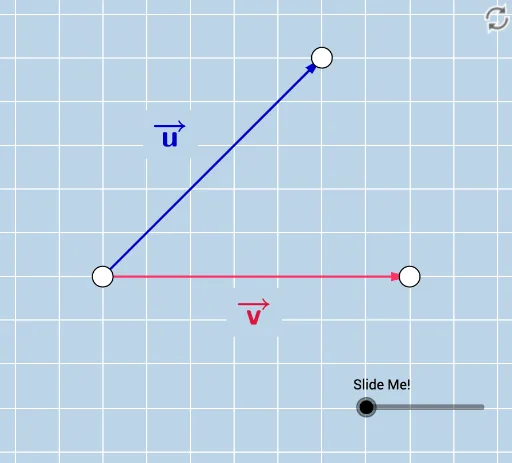
① This GeoGebra example dynamically illustrates the orthogonal projection of vector v onto vector u, showing the projected vector, the perpendicular segment, and the angle between them. ② Core mathematical concepts include the dot product, projection length formula, orthogonal decomposition, vector angle, and right-triangle relationships. ③ Construction details: using GeoGebra commands such as Vector, Point, Line, OrthogonalLine, Intersect, Angle, Ray, Circle, Dilate, Segment, Distance, and SurdText, the applet builds vectors v and u, the projection point G', the foot of the perpendicular, auxiliary circles and segments, and displays distances and angles as dynamic text. ④ Suitable for high school and early college students learning vector algebra and analytic geometry, and for teachers demonstrating the geometric meaning of vector projection to support understanding of the projection formula.
GeoGebra Commands & Parameters
Vector(A, B) → vLine(A, B) → fPoint(f) → CPoint(f) → DVector(A, E) → uOrthogonalLine(E, f) → gIntersect(f, g) → FVector(A, F) → wVector(F, E) → bAngle(E, F, A) → αRay(A, D) → hRay(B, C) → iLine(A, g) → jLine(B, g) → kCircle(A, 1 / 2) → dCircle(B, 1 / 2) → eIntersect(d, j, 1) → GIntersect(e, k, 1) → HDilate(G, If[0 < c ≤ 1, 1 - c, 0], H) → G'Dilate(A, If[0 < c ≤ 1, 1 - c, 0], F) → A'Vector(A, A') → mSegment(F, E) → nDistance(A, E) → distanceAEDistance(A, B) → distanceABDistance(G, G') → distanceGG'Intersect(e, k, 1) → IIntersect(e, k) → J, KIntersect(d, j) → L, MDilate(M, If[0 < c ≤ 1, 1 - c, 0], K) → M'Distance(M, K) → distanceMKAngle(E, A, B) → βPoint(f) → NRay(F, N) → lDistance(A, A') → distanceAA'SurdText(p) → text3Distance(O, P) → distanceOPSurdText(xx) → text6SurdText(yy) → text7
AI Drawing Prompt Reference
Draw vector v and vector u, and their orthogonal projection. First, create vector v and vector u, then find the orthogonal projection point G' of vector u onto vector v, and display the projection vector w, the foot of the perpendicular F, and the angle α. Next, draw auxiliary circles and segments to show dynamic distances and angles, and finally adjust the position of projection point G' to observe changes in the projection length.
The prompt above was compiled from the original drawing commands and is for reference only.