
Matrix Inverse Demonstration
Loading the math board and drawing, please wait…
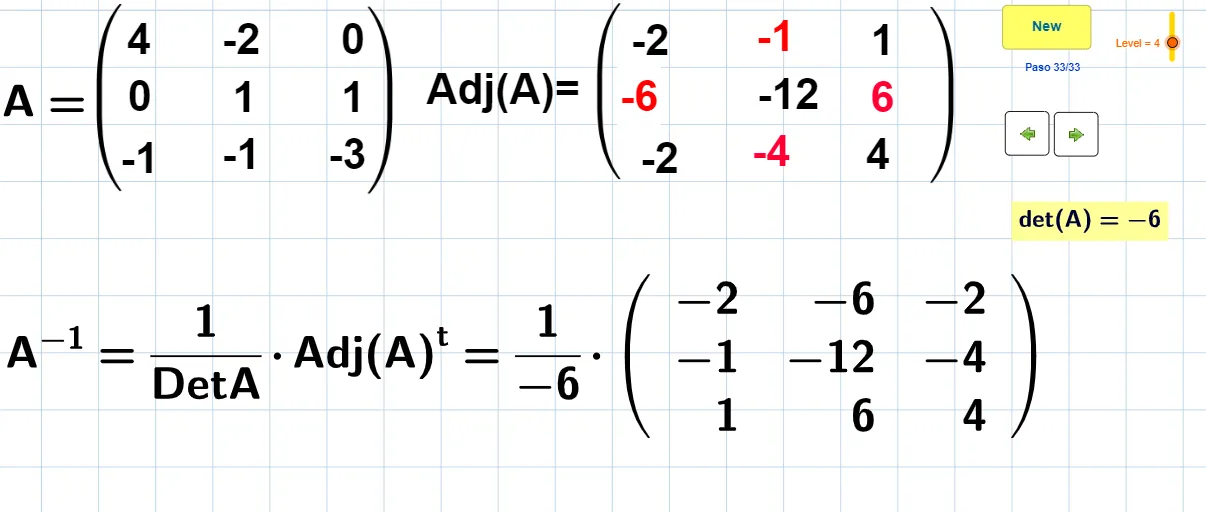
This example demonstrates how to calculate and visualize the determinant, adjugate matrix, and inverse of a 3x3 matrix using GeoGebra. It involves core mathematical concepts such as matrix operations, determinant calculation, adjugate matrix construction, and properties of matrix inversion. The construction leverages GeoGebra commands like Random for generating random matrix elements, Div for division operations, and Segment for drawing segments, with objects including matrix elements aij, temporary objects tij, matrices A, B, C, etc. It is suitable for high school and above students learning linear algebra, particularly for introductory teaching on matrix theory and its practical applications.
GeoGebra Commands & Parameters
Random((-Level), Level) → a11Random((-Level), Level) → a21Random((-Level), Level) → a31Random((-Level), Level) → a12Random((-Level), Level) → a22Random((-Level), Level) → a32Random((-Level), Level) → a13Random((-Level), Level) → a23Random((-Level), Level) → a33Div(c - 13, 2) → aSegment(H, I) → fSegment(H_1, I_1) → f_1Segment(H_2, I_2) → f_2Segment(J, K) → gSegment(J_1, K_1) → g_1Segment(J_2, K_2) → g_2Segment(P, Q) → hSegment(R, S) → iSegment(S, T) → jSegment(R, T) → kSegment(W, U) → lSegment(U, V) → mSegment(V, W) → nSegment(W, T) → pSegment(S, V) → qSegment(P, V) → rSegment(S, P) → sSegment(R, U) → tSegment(U, Q) → dSegment(Q, R) → e
AI Drawing Prompt Reference
Create a geometric demonstration of a 3x3 matrix inverse. Start by randomly placing nine matrix elements on the coordinate plane. Then compute the determinant, adjugate, and inverse, and connect relevant points with line segments to show the transformation relationships. The figure includes several triangles and quadrilaterals formed by colored segments, representing rows, columns, and the geometric meaning of the inverse. The layout is clear for visualizing matrix operations.
The prompt above was compiled from the original drawing commands and is for reference only.