
Matrix Multiplication
Loading the math board and drawing, please wait…
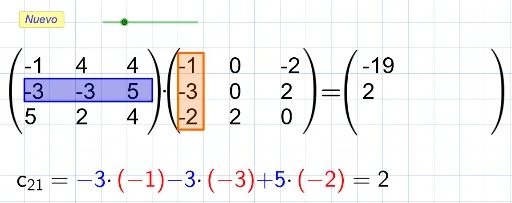
This example demonstrates the process of matrix multiplication. It involves the core mathematical concept of matrix operations. Using GeoGebra commands such as Sequence, Translate, and Polygon, matrices are constructed and multiplied. Suitable for middle school math education, it helps students understand the specific steps and geometric meaning of matrix multiplication.
GeoGebra Commands & Parameters
Sequence(Sequence[Random[(-tope), tope], j, 1, columnas], i, 1, filas) → ASequence(Text[("" * Element[A, Div[i - 1, columnas] + 1, Mod[i - 1, columnas] + 1]), P_1 + ((2 * Mod[i - 1, columnas]), (-Div[i - 1, columnas]))], i, 1, total) → l2Sequence(Sequence[Random[(-tope), tope], j, 1, columnas2], i, 1, filas2) → BTranslate(P_1, Vector[(2 * (columnas, 0))]) → P_3Sequence(Text[("" * Element[B, Div[i - 1, columnas2] + 1, Mod[i - 1, columnas2] + 1]), P_3 + ((2 * Mod[i - 1, columnas2]), (-Div[i - 1, columnas2]))], i, 1, total2) → l1Translate(P_1, Vector[(2.2 * (columnas + columnas2, 0))]) → DPolygon(E, F, H, G) → c1, e, f, h, gPolygon(J, L, K, I) → c2, j, l, k, iSequence(Text[("" * Element[C, Mod[i - 1, columnas2] + 1, Div[i - 1, columnas2] + 1]), D + ((2 * Div[i - 1, columnas2]), (-Mod[i - 1, columnas2]))], i, 1, t) → l3
AI Drawing Prompt Reference
Create a geometric diagram illustrating matrix multiplication. On the left, show two matrices as grids of random numbers, each number placed in a small square cell. On the right, display a rectangular area for the resulting product matrix. Use arrows or translation vectors to connect the two left matrices to the right result, indicating the multiplication process. Arrange the three matrices from left to right with clear spacing, and label their dimensions.
The prompt above was compiled from the original drawing commands and is for reference only.