
Definite Integral Dynamic Illustrator: Left, Right, and Midpoint Riemann Sums
Loading the math board and drawing, please wait…
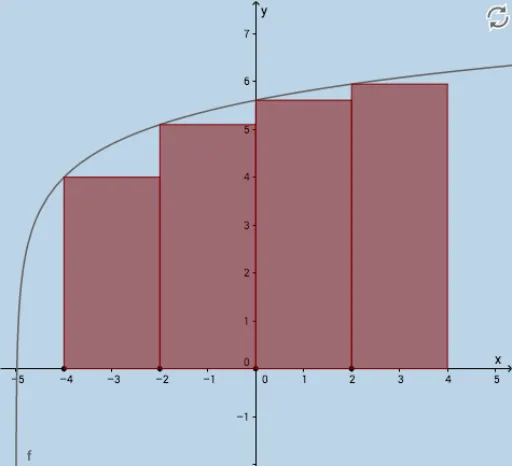
① This interactive GeoGebra example dynamically illustrates the geometric meaning of left endpoint, right endpoint, and midpoint Riemann sum approximations for a definite integral, and compares them with the exact integral value. ② Core mathematical concepts include definite integrals, Riemann sums, partition of intervals, limit concepts, and area approximation under a curve. ③ Construction highlights: uses Textfield and InputBox for interactive inputs, Sequence to generate partition points, LeftSum, Sum, and Integral commands to compute approximations and exact integrals, Polygon to draw rectangles, and Translate, Intersect, and other commands to build auxiliary elements, with sliders or input boxes to adjust the number of subintervals n. ④ Suitable for advanced high school or introductory college calculus, ideal for classroom demonstrations or self-study to deepen understanding of the definition of the definite integral and numerical approximation techniques.
GeoGebra Commands & Parameters
Textfield(f) → InputBox1Textfield(a) → InputBox2Textfield(b) → InputBox3Sequence((a + (i * deltax), 0), i, 1, n, 1) → rightxSequence((a + (i * deltax), f(a + (i * deltax))), i, 1, n, 1) → fofrightxSequence((a + (i * deltax), 0), i, 0, n - 1, 1) → leftxSequence(Midpoint[Element[leftx, i], Element[rightx, i]], i, 1, n, 1) → midpointsSequence((a + (i * deltax), f(a + (i * deltax))), i, 1, n, 1) → list1Translate(list1, (deltax, 0)) → list1'LeftSum(f, a, b, n) → lSequence(x = x(Element[midpoints, i]), i, 1, n, 1) → list2Sequence(Intersect[f, Element[list2, i], (3, 6.079441541679836)], i, 1, n, 1) → list3Translate(list3, (deltax / 2, 0)) → midpointtoprightTranslate(list3, (((-deltax)) / 2, 0)) → midpointtopleftTranslate(midpoints, (deltax / 2, 0)) → midpoints'Translate(midpoints, (((-deltax)) / 2, 0)) → midpoints'_1Sequence(Polygon[Element[midpoints'_1, i], Element[midpoints', i], Element[midpointtopright, i], Element[midpointtopleft, i]], i, 1, n, 1) → list4Sum(list4) → hTranslate(list1, ((-deltax), 0)) → list1'_1Translate(rightx, ((-deltax), 0)) → rightx'Sequence(Polygon[Element[rightx, i], Element[list1, i], Element[list1'_1, i], Element[rightx', i]], i, 1, n, 1) → rightrectanglesumSum(rightrectanglesum) → jIntersect(k, p) → FIntersect(m, k) → GPolygon(D, E, G, F) → poly1, d_1, e, g_1, f_1Intersect(m, q) → HIntersect(p, q) → IPolygon(D, E, H, I) → poly2, d_2, e_1, h_1, i_1Intersect(p, r) → JIntersect(r, m) → KPolygon(D, E, K, J) → poly3, d_3, e_2, k_1, j_1Integral(f, a, b) → s
AI Drawing Prompt Reference
Draw a definite integral graph of a function f(x) over the interval [a, b], including Riemann sums with left endpoints, right endpoints, and midpoints. First, input the function f(x), the start point a, and the end point b. Then, based on the interval length and the number of subintervals n, generate sequences of left, right, and midpoint points. Next, draw the Riemann sums for left endpoints, right endpoints, and midpoints, including rectangles for left and right endpoints, and rectangles for midpoints. Finally, calculate and display the values of these Riemann sums and the exact integral value.
The prompt above was compiled from the original drawing commands and is for reference only.