
Vector Projection: Geometric Construction and Visualization
Loading the math board and drawing, please wait…
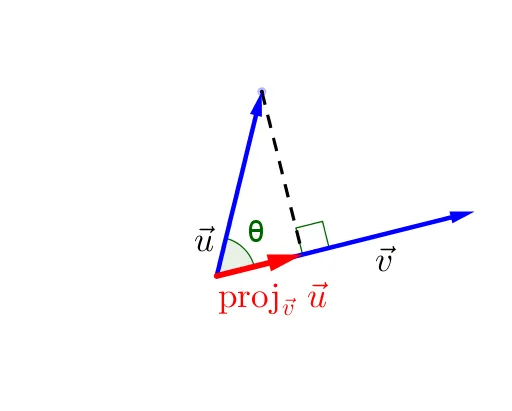
① This GeoGebra example dynamically demonstrates the projection of one vector onto another, visually illustrating the geometric meaning of the projection vector. ② Core mathematical concepts include the dot product, projection formula, orthogonal decomposition, and the relationship between the angle and projection length, with additional elements such as ellipse, geometric mean, and logarithmic functions for extended exploration. ③ Construction details: using commands Line, Vector, OrthogonalLine, Intersect, Angle, and Segment, the objects C, B, A, c, v, a, E, u, α, text1, text1_1, b, β, text2, and w are created; the orthogonal line determines the perpendicular foot, intersection marks the projection point, angle tool measures the angle, and segments represent the projection vector. ④ Suitable for high school or early college vector lessons, geometric construction practice, and dynamic math experiments to deepen understanding of both algebraic and geometric aspects of projection.
GeoGebra Commands & Parameters
Line(A, C) → cVector(A, C) → vOrthogonalLine(B, v) → aIntersect(a, c) → EVector(A, B) → uAngle(C, A, B) → αSegment(B, E) → bAngle(C, E, B) → βVector(A, E) → w
AI Drawing Prompt Reference
Create a 2D geometric diagram with points A, B, C. Draw the line through A and C and show the vector from A to C. Through B, construct a line orthogonal to that vector, and let it intersect the line AC at point E (the perpendicular foot). Add a second vector from A to B for comparison. Measure the angle at A formed by rays AC and AB, labeled α. Display the projection length with the segment from B to E, and measure the angle with rays EC and EB, labeled β. Finally, draw the projection vector from A to E, emphasizing the geometric meaning of vector projection.
The prompt above was compiled from the original drawing commands and is for reference only.