
Interactive Investigation of Dot Product
Loading the math board and drawing, please wait…
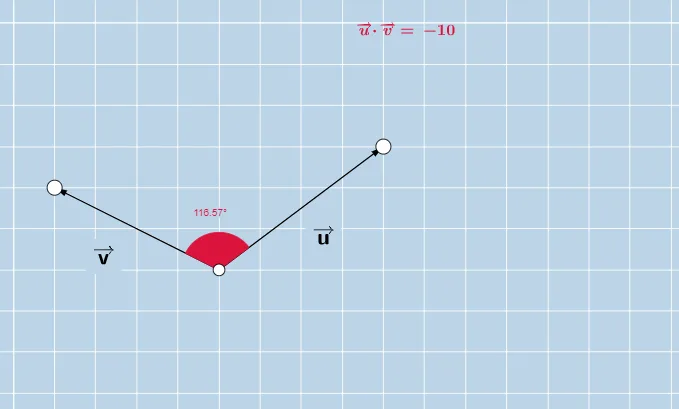
① This example demonstrates the geometric meaning and numerical computation of the dot product of two vectors through interactive dragging. ② Core mathematical concepts include the definition of dot product, the relationship between dot product and the angle between vectors, vector magnitudes (distances), and applications in geometry. ③ Construction highlights: using GeoGebra commands Vector to create vectors u and v, Angle to measure the included angle α, Distance to compute magnitudes (distanceAB, distanceAC), and Text objects to dynamically display dot product values and angle information, along with auxiliary triangles and rectangles for visual insight. ④ Suitable for high school and early college students learning vector algebra and coordinate geometry, and as a visual foundation for vector fields and line integrals in calculus.
GeoGebra Commands & Parameters
Vector(A, B) → uVector(A, C) → vAngle(B, A, C) → αDistance(A, B) → distanceABDistance(A, C) → distanceACAngle(B, A, C) → βAngle(B, A, C) → γ
AI Drawing Prompt Reference
Draw two draggable vectors, display the angle between them and their magnitudes, dynamically calculate and show their dot product, and use auxiliary triangles and rectangles to help understand the relationship between the dot product, the angle between vectors, and vector lengths, suitable for students learning vector algebra and coordinate geometry.
The prompt above was compiled from the original drawing commands and is for reference only.