
Vector Line Equations (2D) Interactive Demo
Loading the math board and drawing, please wait…
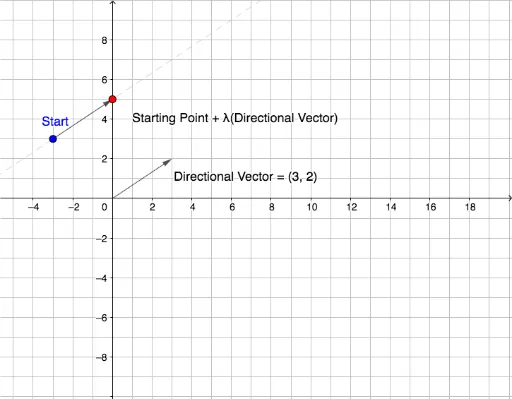
① This GeoGebra example visually demonstrates the vector equation of a line in two dimensions, showing how a point moves along the line as the parameter λ changes. ② Core mathematical concepts include vector parametric equations, direction vectors, position vectors, and the parameterization of a line in analytic geometry. ③ Construction details: The Vector command creates vectors u and v, the Line command constructs line f, and objects such as a, b, Start, λ, w, c, B, d, e, along with text1 and text2, are used to display the equation and dynamic values. A slider controls λ to animate point B along the line. ④ This is ideal for high school or undergraduate students studying analytic geometry and vector algebra, and for teachers demonstrating the connection between point-direction form and parametric equations in a dynamic, visual way.
GeoGebra Commands & Parameters
Vector((a, b)) → uVector(Start, (x(Start) + (λ * a), y(Start) + (λ * b))) → vVector((x(Start), y(Start))) → wVector((x(Start) + (λ * a), y(Start) + (λ * b))) → cLine(Start, B) → f
AI Drawing Prompt Reference
Draw a 2D coordinate plane with a fixed starting point and a moving point controlled by a parameter. Show a direction vector from the origin)Skip, and a position vector from the starting point. The moving point travels along a straight line defined by the starting point and the direction vector. Include a slider to adjust the parameter, and display the vector equation of the line with the current parameter value.
The prompt above was compiled from the original drawing commands and is for reference only.