
Vector Function and Parametric Curve Visualization (2)
Loading the math board and drawing, please wait…
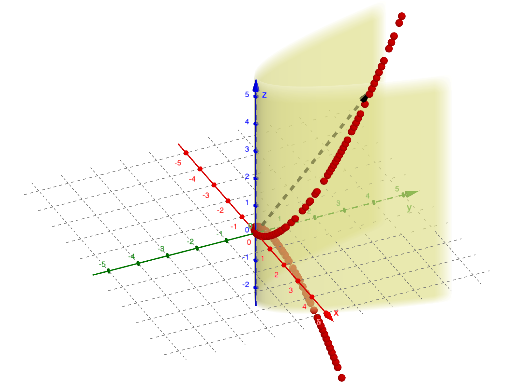
This example demonstrates how to visualize a curve generated by a vector function, where the geometry evolves according to one or more parameters. The key ideas are vectors (direction and magnitude), function graphing, and parametric curves (moving points driven by parameters) expressed through vector constructions. In GeoGebra, it is built using the commands CurveCartesian and Vector, producing and linking objects such as the function f, a reference/starting object a, parameter variables t and u, and a key geometric object A. By varying the parameters, learners can see how the vector’s behavior corresponds to the resulting curve/trajectory, building intuition for vector-function-based graphical models. Suitable for high school to early university use in instruction on functions, graphing, analytic geometry, and parametric curve exploration.
GeoGebra Commands & Parameters
CurveCartesian(t, t^(2), t^(3), t, -3, 3) → aVector((0, 0, 0), (t, t^(2), t^(3))) → u
AI Drawing Prompt Reference
Visualize a curve generated by a vector function, showing the geometric evolution as the vector changes with a parameter t. Include a vector starting from the origin with its direction and magnitude determined by t, and trace its endpoint to form a cubic parametric curve. Observe the relationship between the vector's behavior and the curve's shape by adjusting the range of t, gaining intuition about vector function graphical models.
The prompt above was compiled from the original drawing commands and is for reference only.