
Vasarely-style Homothety: Conic Curves and Segment Assembly
Loading the math board and drawing, please wait…
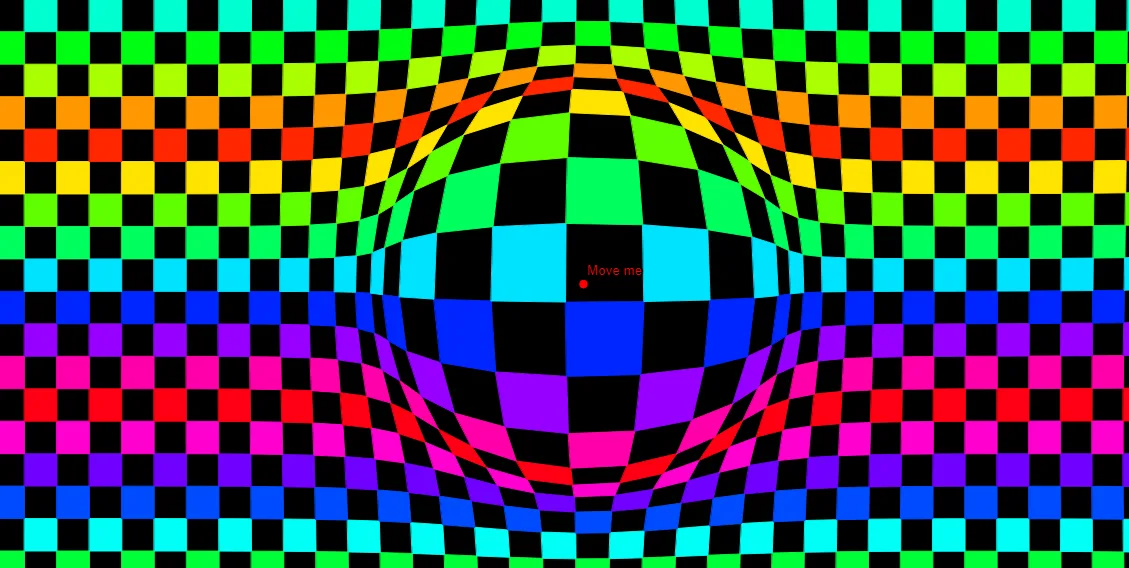
This example demonstrates a Vasarely-inspired geometric artwork built from homothety (centered ratio scaling). Starting from a base configuration of points and a generated index/parameter sequence, the construction creates repeated structured elements that involve ellipse-related geometry and connecting line segments, producing a visually rhythmic, symmetric pattern. Key mathematical ideas include homothety (similarity transformation with a fixed center), point/sequence-driven construction of curve parts, tangent-line direction usage for selecting or shaping boundaries, and the assembly of segments and polygonal/patch-like components. In GeoGebra, the build relies on the commands Point, If, Sequence, and Element: Point creates the many indexed points (e.g., A1–A13, B1–B5 and auxiliary points), If conditionally determines which elements/parameters are used, Sequence produces the repeating index/parameter lists, and Element extracts specific entries (e.g., from liste1–liste3 and related variables). The final image is assembled using compound geometric objects such as Poly and segment connections. Suitable for advanced secondary school and early university learners studying geometric transformations, parametric/iterative construction, and creative math visualization in GeoGebra.
GeoGebra Commands & Parameters
Point(y = 1) → GIf(cf, h, g) → fSequence(Sequence[Dilate[(i, j), g(Distance[A, (i, j)]), A], i, 0, n + 20], j, 0, n) → liste1Sequence(Sequence[Dilate[(i, j), k(Distance[C, (i, j)]), C], i, 0, n + 20], j, 0, n) → liste3Sequence(Sequence[Dilate[(i, j), f(Distance[B, (i, j)]), B], i, 0, n + 20], j, 0, n) → liste2Sequence(Sequence[(Element[liste1, j, i] + Element[liste2, j, i] + Element[liste3, j, i]) / 3, i, 1, n + 20], j, 1, n + 1) → PointsSequence(Sequence[Polygon[Element[Points, j, i], Element[Points, j, i + 1], Element[Points, j + 1, i + 1], Element[Points, j + 1, i]], i, 1.5 + (-1)^(j) / 2, n + 20, 2], j, 1, n) → PolyElement(Poly, A1) → B1Element(Poly, A2) → B2Element(Poly, A3) → B3Element(Poly, A4) → B4Element(Poly, A5) → B5Element(Poly, A6) → B6Element(Poly, A7) → B7Element(Poly, A8) → B8Element(Poly, A9) → B9Element(Poly, A10) → B10Element(Poly, A11) → B11Element(Poly, A12) → B12Element(Poly, A13) → B13Element(Poly, A14) → B14Element(Poly, A15) → B15Element(Poly, A16) → B16Element(Poly, A17) → B17Element(Poly, A18) → B18Element(Poly, A19) → B19Element(Poly, A20) → B20Element(Poly, A21) → B21Element(Poly, A22) → B22Element(Poly, A23) → B23Element(Poly, A24) → B24Element(Poly, A25) → B25Element(Poly, A26) → B26Element(Poly, A27) → B27Element(Poly, A28) → B28Element(Poly, A29) → B29Element(Poly, A30) → B30Element(Poly, A31) → B31Element(Poly, A32) → B32Element(Poly, A33) → B33Element(Poly, A34) → B34Element(Poly, A35) → B35
AI Drawing Prompt Reference
Create a Vasarely-style geometric artwork using three fixed centers. For each grid point, apply a homothety (scaling) centered at each of the three points, with the scale factor depending on the distance from that center. Average the three transformed positions to get a new set of points. Connect these points into staggered quadrilaterals, forming a rhythmic pattern of conic-like curves and straight segments. The result should show symmetric, repetitive, and visually flowing geometry.
The prompt above was compiled from the original drawing commands and is for reference only.