
Spline-Based Morphing of Curves
Loading the math board and drawing, please wait…
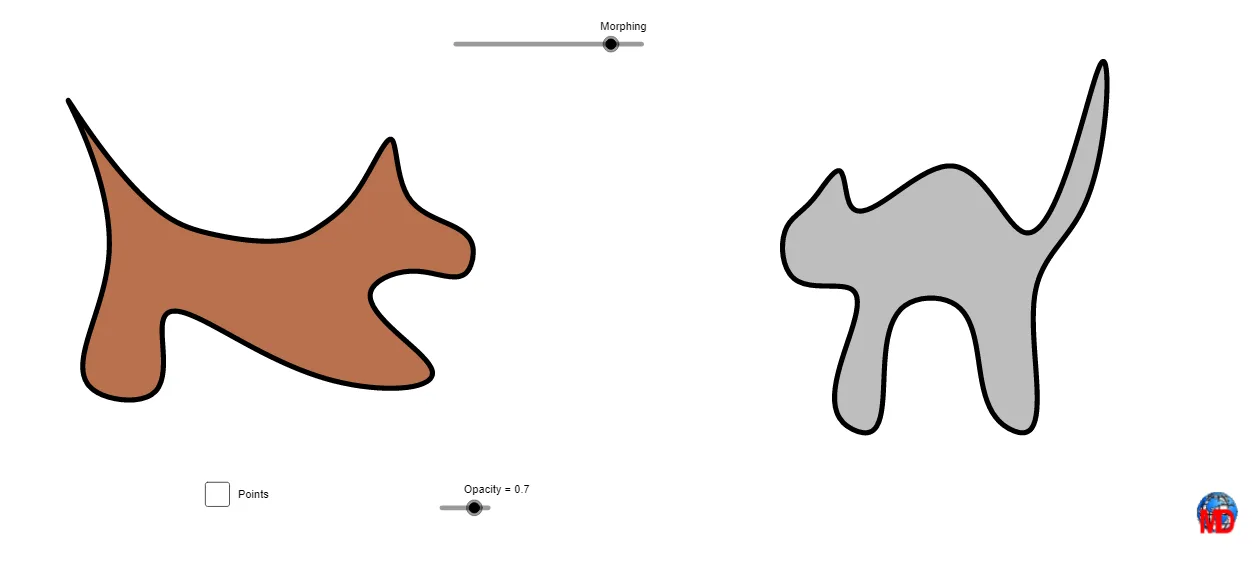
This example demonstrates how to build smooth curves from discrete control points using splines, then produce a continuous morphing animation by updating the corresponding geometry through geometric transformations. The key mathematics includes spline interpolation (Spline) for smooth curve fitting, parameterization via ordered point sets (Sequence) to ensure consistent correspondence during the transition, and transformation principles (e.g., similarity/geometry mapping) to move between shapes in a controlled way. Construction is driven by GeoGebra commands Spline to create the curve segments, Sequence and If to organize control-point sequences and switch logic across morph stages, and a dedicated Morphing result object to render the evolving shape. Many point objects (A–O, A_1–D_1, etc.) together with parameters (l1, l2, l3, a, b, etc.) serve as the adjustable anchors and length/position controls. Suitable for secondary advanced learners, early university courses, and teaching modules on parametric curves, curve sketching, and geometric transformation-based visualization.
GeoGebra Commands & Parameters
Spline(l1, 3) → aSpline(l2, 3) → bSequence(Vector[Element[l1, i], Element[l2, i]], i, 1, Length[l1]) → l3If(Morphing ≤ 5, 0, If[5 < Morphing < 15, (Morphing - 5) / 10, 1]) → dSequence(Translate[Element[l1, i], Vector[(d * Element[l3, i])]], i, 1, Length[l1]) → l4Spline(l4, 3) → eSpline(l1, 3) → cSpline(l4, 3) → g
AI Drawing Prompt Reference
Create smooth spline-based curves from discrete control points and show a continuous morph between two shapes. First, generate two corresponding cubic spline curve segments from two given ordered control sets to represent the start and end configurations. Build a point correspondence by pairing the ordered control points into a single sequence so that each point maps consistently during the transition. Then use a stage-dependent interpolation factor to translate the paired control points: early stage keeps the initial placement, middle stages gradually move points toward the target positions, and the final stage reaches the end placement. Finally, connect the translated points again with a cubic spline to form the intermediate curve and include the relevant curve segments so the animation reflects a smooth, continuous transformation from start to finish.
The prompt above was compiled from the original drawing commands and is for reference only.