
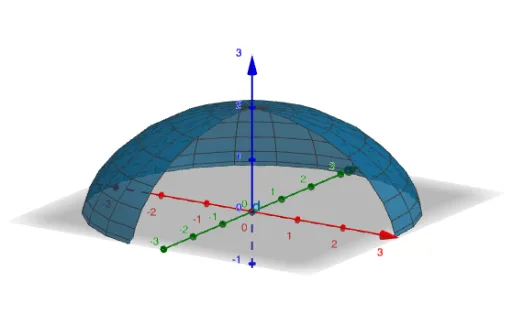
Rotating a Cycloid Around the z-Axis: 3D Construction
Loading the math board and drawing, please wait…
In collections
GeoGebra and Laser Cutting
This example demonstrates how to construct a cycloid as a planar parametric curve, then rotate it around the z-axis to obtain a corresponding 3D surface/solid-like shape. The key mathematics includes parametric curve construction in Cartesian coordinates (CurveCartesian), discrete sampling with sequences (Sequence), intersection-based geometric constraints (Intersect), and building auxiliary geometry using circles and segments (Circle, Segment). For the 3D setup, OrthogonalPlane defines relevant planes for the construction, while Surface is used to generate the rotated surface from the constructed geometry. Practically, the workflow uses Textfield/Input controls to drive parameters, generates the cycloid and its defining points via CurveCartesian, uses Sequence to create sampled points along the curve, employs Intersect to locate crucial constructed points, and relies on Circle/Segment for the rolling/relative geometry. Finally, the rotated point set or curve segments are rendered as a surface, with multiple parameters (e.g., radii and angles such as α-terms) controlling rotation and resolution. Suitable for high school to early university learners studying geometry transformations, parametric functions, and 3D graphing in tools like GeoGebra.
GeoGebra Commands & Parameters
Textfield(f) → InputBox1Textfield(g) → InputBox2Textfield(h) → InputBox3CurveCartesian(f(t), g(t), h(t), t, m, n) → aTextfield(m) → InputBox4Textfield(n) → InputBox5Textfield(r) → InputBox6Textfield(s) → InputBox7Sequence((0, 0, r + (s - r) / ((2 * k)) + ((i * (s - r))) / k), i, 0, k - 1) → l1OrthogonalPlane(l1(1), zAxis) → α_1OrthogonalPlane(l1(2), zAxis) → α_2OrthogonalPlane(l1(3), zAxis) → α_3OrthogonalPlane(l1(4), zAxis) → α_4OrthogonalPlane(l1(5), zAxis) → α_5OrthogonalPlane(l1(6), zAxis) → α_6OrthogonalPlane(l1(7), zAxis) → α_7OrthogonalPlane(l1(8), zAxis) → α_8OrthogonalPlane(l1(9), zAxis) → α_9OrthogonalPlane(l1(10), zAxis) → α_{10}Intersect(α_6, a) → I_{6}, I_{18}Intersect(α_1, a) → I_{1}, I_{17}OrthogonalPlane(l1(11), zAxis) → α_{11}OrthogonalPlane(l1(12), zAxis) → α_{12}OrthogonalPlane(l1(13), zAxis) → α_{13}OrthogonalPlane(l1(14), zAxis) → α_{14}OrthogonalPlane(l1(15), zAxis) → α_{15}Intersect(α_7, a) → I_{7}, I_{19}Intersect(xAxis, yAxis) → ACircle(A, Distance[l1(1), I_{1}], zAxis) → c_{1}Intersect(α_{10}, a) → I_{10}Intersect(α_{11}, a) → I_{11}Intersect(α_{12}, a) → I_{12}Intersect(α_{13}, a) → I_{13}Intersect(α_{14}, a) → I_{14}Intersect(α_{15}, a) → I_{15}Circle(A, Distance[l1(6), I_{6}], zAxis) → c_{6}Circle(A, Distance[l1(7), I_{7}], zAxis) → c_{7}Intersect(α_9, a) → I_{9}Intersect(α_2, a) → I_{2}, I_{16}Intersect(α_4, a) → I_{4}, I_{20}Intersect(α_5, a) → I_{5}, R_2Intersect(α_3, a) → I_{3}, R_1Intersect(α_8, a) → I_{8}, R_3Circle(A, Distance[l1(2), I_{2}], zAxis) → c_{2}Circle(A, Distance[l1(3), I_{3}], zAxis) → c_{3}Circle(A, Distance[l1(4), I_{4}], zAxis) → c_{4}Circle(A, Distance[l1(9), I_{9}], zAxis) → c_{9}Segment(J, I_{5}) → iCircle(A, i, zAxis) → c_5Circle(A, Distance[l1(10), I_{10}], zAxis) → c_{10}Circle(A, Distance[l1(11), I_{11}], zAxis) → c_{11}Circle(A, Distance[l1(12), I_{12}], zAxis) → c_{12}Segment(K, I_{8}) → jCircle(A, Distance[l1(13), I_{13}], zAxis) → c_{13}Circle(A, Distance[l1(14), I_{14}], zAxis) → c_{14}Circle(A, j, zAxis) → c_{8}Surface(a, α, zAxis) → d
AI Drawing Prompt Reference
Draw a 3D surface formed by rotating a cycloid around the z-axis. The cycloid is a planar parametric curve, and after rotation it creates a rotational surface. Key objects include the cycloid curve, the z-axis, and auxiliary circles and line segments. The circles and line segments are used to locate rotation points and establish geometric constraints. The construction order: first draw the cycloid, then rotate it around the z-axis, define relevant planes, locate key points, use circles and line segments for auxiliary geometry, and finally generate the rotational surface.
The prompt above was compiled from the original drawing commands and is for reference only.