
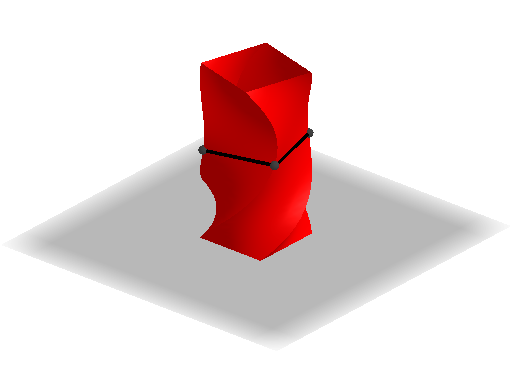
Rotated Distorted Column
Loading the math board and drawing, please wait…
In collections
3D printing in the school can be cool
This example demonstrates how to distort a square-based column through rotations, creating interesting shapes. It involves core math concepts like rotation, surface, and volume calculation via Cavalieri's Principle. Construction uses GeoGebra commands: Ray, Point, Segment, Surface, Rotate; objects include a, k, f, g, h, A, p, i, b, b', b'_1, b'_2, j, B, l, C, C', C'_1, C'_2, m, n, q, r, c. Suitable for high school solid geometry education to understand rotational transformations and volume relationships.
GeoGebra Commands & Parameters
Ray((0, 0, 0), (0, 0, 1)) → gRay((0, 0), (1, 0)) → hPoint(h) → ASegment(A, (x(A), f(x(A)))) → iSurface(cos(f(u)) - (sin(f(u)) * v), sin(f(u)) + (cos(f(u)) * v), u, u, 0, x(A), v, -1, 1) → bRotate(b, π / 2, g) → b'Rotate(b, π / 2 + π / 2, g) → b'_1Rotate(b, π / 2 + π / 2 + π / 2, g) → b'_2Segment((0, 0), A) → jPoint(j) → BSegment(B, (x(B), f(x(B)))) → lRotate(C, π / 2, g) → C'Rotate(C, π / 2 + π / 2, g) → C'_1Rotate(C, π / 2 + π / 2 + π / 2, g) → C'_2Segment(C'_2, C) → mSegment(C, C') → nSegment(C', C'_1) → qSegment(C'_1, C'_2) → r
AI Drawing Prompt Reference
Draw a column shape that is distorted by rotation. The column has a square cross-section that rotates and changes shape. Include the original column and its rotated versions to show how rotation affects the shape. The construction order starts with the original column and then rotates it to create multiple variations, demonstrating the relationship between them.
The prompt above was compiled from the original drawing commands and is for reference only.