
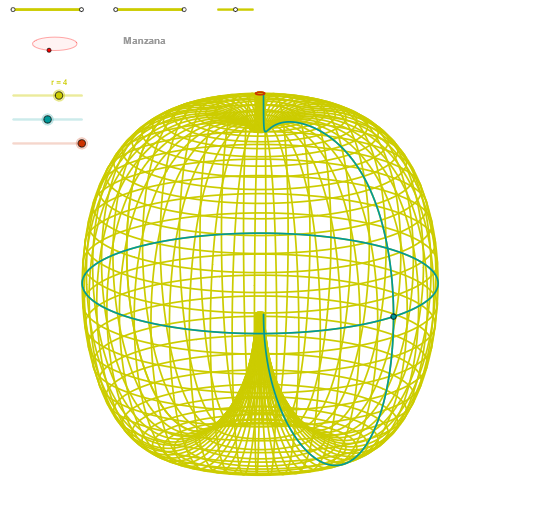
Apple (Manzana) – Geometric Art with Rotation and Ellipses
Loading the math board and drawing, please wait…
In collections
geometriadinamica.es
① This GeoGebra example demonstrates a geometric figure named 'Apple' (Manzana), composed of rotated ellipses, segments, circles, and intersection points, forming an apple-like silhouette. ② Core mathematical concepts include rotation, ellipse equations, standard deviation as a geometric measure, multiplication and arithmetic operations, as well as parametric curves (CurveCartesian) and sequences (Sequence). ③ Construction highlights: commands such as Segment, Point, OrthogonalLine, Circle, Intersect, Ellipse, Angle, CurveCartesian, and Sequence are used, with numerous auxiliary objects (u10, p, v10, Q4, Q3, p2, P3, etc.) to generate the apple shape through rotation and ellipse parameterization. ④ Suitable for high school to university students and teachers studying analytic geometry, parametric equations, rotation transformations, and advanced GeoGebra construction techniques; also valuable for mathematical art creation or demonstrating the beauty of combining geometry and algebra.
GeoGebra Commands & Parameters
Segment(Q3, Q4) → p2Point(p2) → P3Segment(P3, Q4) → p4Point(p4) → P4Segment(Q1, Q2) → p1Point(p1) → P1Segment(P1, Q2) → p3Point(p3) → P2OrthogonalLine(C, xAxis) → zz2Circle(C, 0.62) → zz0Intersect(zz0, zz2, 1) → ZZ4Intersect(zz0, zz2, 2) → ZZ3Ellipse(ZZ3, ZZ4, 0.65) → zElipse2Point(zElipse2) → ZIntersect(zElipse2, zz2) → ZZ7, ZZ8Angle(ZZ8, C, Z) → zAngIncOrthogonalLine(C, yAxis) → zz1Intersect(zz0, zz1, 2) → ZZ2Intersect(zz0, zz1, 1) → ZZ1Ellipse(ZZ1, ZZ2, 0.65) → zElipse1Point(zElipse1) → XYIntersect(zElipse1, zz1) → ZZ5, ZZ6Angle(ZZ6, C, XY) → zAngRotSegment(Q5, Q6) → p5Point(p5) → P5Segment(ZZ5, ZZ6) → zz4Segment(ZZ7, ZZ8) → zz3Intersect(zElipse2, zElipse1, 1) → zPunto1Intersect(zElipse2, zElipse1, 4) → zPunto2Segment(zPunto1, zPunto2) → zSeg2CurveCartesian((r / 6 * (((cos(α) * (4 + (3.8 * cos(v)))) * sin(zAngRot)) + ((sin(α) * (4 + (3.8 * cos(v)))) * cos(zAngRot)))), (r / 6 * (((((-cos(α)) * (4 + (3.8 * cos(v)))) * cos(zAngRot)) * sin(zAngInc)) + (((sin(α) * (4 + (3.8 * cos(v)))) * sin(zAngRot)) * sin(zAngInc)) + (((((cos(v) + sin(v) - 1) * (1 + sin(v))) * ln(1 - (3.14159 * v / 10))) + (7.5 * sin(v))) * cos(zAngInc)))), v, v1, v2) → curva2CurveCartesian((r / 6 * (((cos(u) * (4 + 3.8)) * sin(zAngRot)) + ((sin(u) * (4 + 3.8)) * cos(zAngRot)))), (r / 6 * (((((-cos(u)) * (4 + 3.8)) * cos(zAngRot)) * sin(zAngInc)) + (((sin(u) * (4 + 3.8)) * sin(zAngRot)) * sin(zAngInc)))), u, u1, u2) → curva1CurveCartesian((r / 6 * (((cos(u) * (4 + (3.8 * cos(β - 3.14159)))) * sin(zAngRot)) + ((sin(u) * (4 + (3.8 * cos(β - 3.14159)))) * cos(zAngRot)))), (r / 6 * (((((-cos(u)) * (4 + (3.8 * cos(β - 3.14159)))) * cos(zAngRot)) * sin(zAngInc)) + (((sin(u) * (4 + (3.8 * cos(β - 3.14159)))) * sin(zAngRot)) * sin(zAngInc)) + (((((cos(β - 3.14159) + sin(β - 3.14159) - 1) * (1 + sin(β - 3.14159))) * ln(1 - (3.14159 * (β - 3.14159) / 10))) + (7.5 * sin(β - 3.14159))) * cos(zAngInc)))), u, u1, u2) → a1Sequence(CurveCartesian[(r / 6 * (((cos(u) * (4 + (3.8 * cos(v)))) * sin(zAngRot)) + ((sin(u) * (4 + (3.8 * cos(v)))) * cos(zAngRot)))), (r / 6 * (((((-cos(u)) * (4 + (3.8 * cos(v)))) * cos(zAngRot)) * sin(zAngInc)) + (((sin(u) * (4 + (3.8 * cos(v)))) * sin(zAngRot)) * sin(zAngInc)) + (((((cos(v) + sin(v) - 1) * (1 + sin(v))) * ln(1 - (3.14159 * v / 10))) + (7.5 * sin(v))) * cos(zAngInc)))), v, v1, v2], u, u1, u2, paso) → list2Sequence(CurveCartesian[(r / 6 * (((cos(u) * (4 + (3.8 * cos(v)))) * sin(zAngRot)) + ((sin(u) * (4 + (3.8 * cos(v)))) * cos(zAngRot)))), (r / 6 * (((((-cos(u)) * (4 + (3.8 * cos(v)))) * cos(zAngRot)) * sin(zAngInc)) + (((sin(u) * (4 + (3.8 * cos(v)))) * sin(zAngRot)) * sin(zAngInc)) + (((((cos(v) + sin(v) - 1) * (1 + sin(v))) * ln(1 - (3.14159 * v / 10))) + (7.5 * sin(v))) * cos(zAngInc)))), u, u1, u2], v, v1, v2, paso) → list1
AI Drawing Prompt Reference
Create a geometric “apple” silhouette in the plane using ellipses and rotated parametric curves. Start with a coordinate system, an origin-centered circle, and construct points from intersections between the circle and perpendicular directions given by the axes. Use those intersection points as parameters/foci to draw two intersecting ellipse curves, and mark their key intersection points. From the circle–ellipse configuration derive a rotation angle and a secondary inclination angle. Then define parametric Cartesian curves whose x–y coordinates depend on these two angles and on trigonometric expressions involving two parameters; sample the curves over specified parameter ranges to generate a sequence of points. Connect selected pairs of points with short segments and combine the resulting curve pieces from both ellipse-related constructions so the overall figure resembles an apple outline with many intersections and segment accents.
The prompt above was compiled from the original drawing commands and is for reference only.