
Unit Circle Geometric Construction
Loading the math board and drawing, please wait…
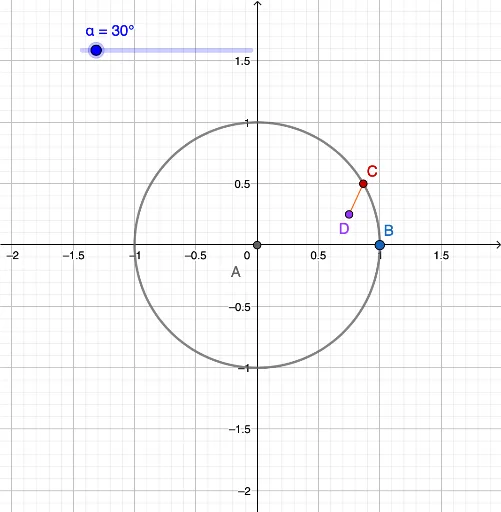
This GeoGebra example demonstrates the geometric construction of a unit circle and its relationship with right triangles and trigonometric functions. Core mathematical concepts include the unit circle definition, circular coordinates, sine and cosine functions, and angle measurement. The construction utilizes GeoGebra commands such as Intersect, Point, Circle, Angle, and Segment to create interactive points, circles, angles, and line segments. It is suitable for high school mathematics, trigonometry introduction, and coordinate geometry lessons, helping students intuitively understand the correspondence between angles and circular coordinates.
GeoGebra Commands & Parameters
Intersect(xAxis, yAxis) → APoint(xAxis) → BCircle(A, B) → cAngle(B, A, C) → βSegment(A, C) → fSegment(D, C) → g
AI Drawing Prompt Reference
Draw a unit circle centered at the origin of a coordinate plane. Place a movable point on the circle, and connect it to the center and to a fixed point on the positive x-axis, forming a radius and a horizontal segment. From the center, draw a ray along the positive x-axis intersecting the circle at a point, which together with the center and the movable point defines an angle that changes as the point moves. Drop a perpendicular from the movable point to the x-axis, marking the foot on the axis. The diagram shows the circle, radius, horizontal segment, vertical segment, and angle, illustrating the relationship between circular coordinates and trigonometric functions.
The prompt above was compiled from the original drawing commands and is for reference only.