
Unit Circle Exact Values: Geometric Construction for Key Angles
Loading the math board and drawing, please wait…
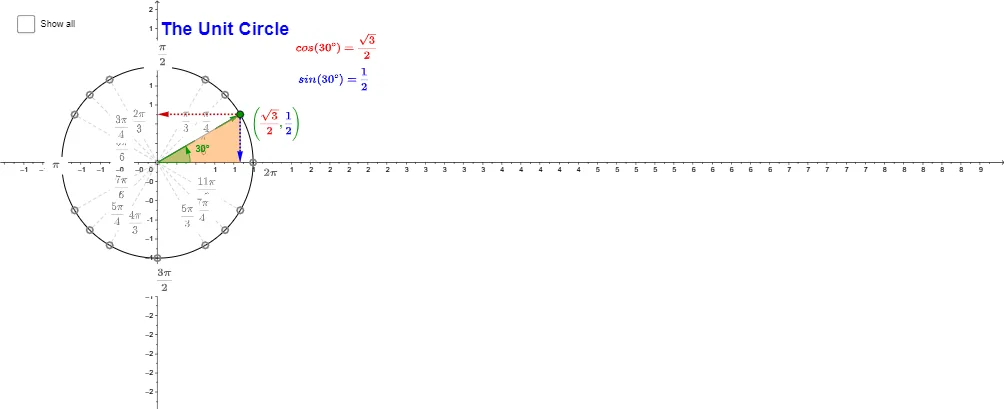
This example demonstrates how key angles on the unit circle correspond to exact coordinates and trigonometric values by using geometric relationships (including right triangles and similarity). It centers on the unit circle, the link between points on the circle and sine/cosine values, angle measurement/labeling, and similarity-based proportional reasoning to obtain exact results. Construction highlights include using Intersect to compute circle–line intersections that define points on the circle, Point to mark critical and auxiliary vertices, Circle to create the relevant (unit) circle, and Segment to draw triangle sides and structural edges. Distances are measured with Distance to extract the needed lengths, while Angle is used to construct/verify the target angles. Vector and Polygon help organize directed relations and the polygonal structure used for the similarity setup, and text labels (e.g., for angles and numeric markers such as α, d) present the exact values directly on the diagram. Suitable for high-school mathematics and early trigonometry instruction, especially for visualizing why special-angle values on the unit circle are exact rather than approximate.
GeoGebra Commands & Parameters
Intersect(xAxis, yAxis) → OPoint(xAxis) → ECircle(O, E) → c_1Point(c_1) → XSegment(O, X) → aDistance(X, A_1) → bAngle(E, O, X) → αSegment(A_1, (x(A_1), 0)) → fSegment(A_2, (x(A_2), 0)) → gSegment(B_2, B_1) → hSegment(C_2, C_1) → iVector(O, X) → uVector(X, (x(X), 0)) → vVector(X, (0, y(X))) → wPoint(u) → ASegment(A, C_2) → eSegment(A, B_2) → jSegment(A, A_2) → kSegment(A, A_3) → lSegment(A, B_3) → mSegment(A, C_3) → nSegment(A, C_4) → pSegment(A, B_4) → qSegment(A, A_4) → rSegment(A, A_1) → s_1Segment(A, B_1) → tSegment(A, C_1) → a_1Polygon(X, (x(X), 0), A) → poly1, a_2, B, b_1Polygon((abs(x(X)), abs(y(X))), A, (abs(x(X)), 0)) → poly2, d_1, e_1, a_3
AI Drawing Prompt Reference
Draw a unit circle and mark key angles with their corresponding sine and cosine values. Start by drawing the intersection point O of the x-axis and y-axis, then draw circle c_1 with O as the center and E as the radius. Next, take a point X on the circle and draw line segment OX, measure the distance b from X to A_1, and construct angle α. Use vectors and line segments to construct auxiliary line segments and triangles, ultimately forming similar triangles to calculate the exact sine and cosine values for special angles.
The prompt above was compiled from the original drawing commands and is for reference only.