
ASA Exploration: Building Triangle Configurations from Two Angles and a Side
Loading the math board and drawing, please wait…
In collections
Triangle Congruency Exploration
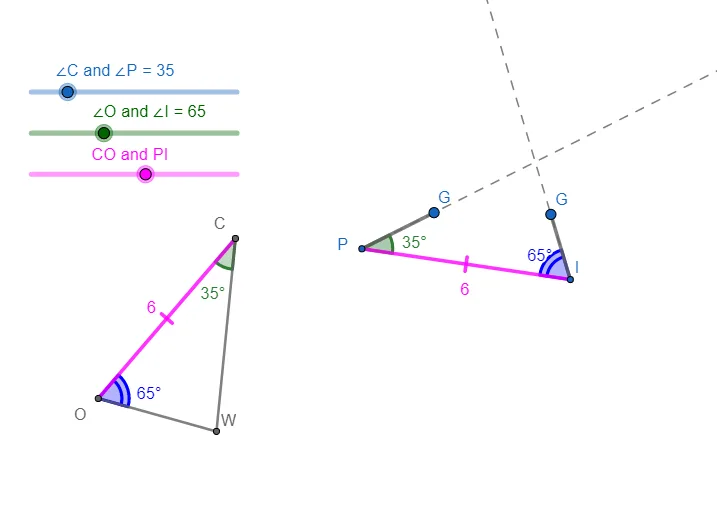
This example demonstrates how the ASA principle (two angles and the included side) can be used to explore and construct geometric configurations involving triangles, their angle measures, and derived quantities such as cosine-based relationships and area behavior. It centers on core ideas from triangle geometry: ASA-based determination/constructibility, angle measurement, circle geometry (using circles and intersections to enforce constraints), and trigonometric links (e.g., cosine connections and triangle area relations). The construction is built with GeoGebra commands including Circle (creating guiding circles), Point (defining key vertices/parameters), Segment (forming sides), Rotate (producing rotated angle-consistent positions), Angle and Ray (measuring/encoding angular constraints), and Intersect (computing intersection points that determine the next elements). The model uses labeled objects and angle parameters (α, β, γ, δ) along with corresponding transformed points (e.g., A vs. A′, E vs. E′, F vs. F′) to create an interactive exploration. Suitable for secondary-school geometry, competitive math training, and early undergraduate geometry courses where students learn to construct, test, and verify triangle configurations with dynamic geometry tools.
GeoGebra Commands & Parameters
Circle(E, s) → dPoint(d) → FCircle(A, s) → cPoint(c) → BSegment(A, B) → fRotate(B, a1°, A) → B'Angle(B, A, B') → αRay(A, B') → gRotate(A, (-(a2°)), B) → A'Angle(A', B, A) → βRay(B, A') → hPoint(g) → CSegment(A, C) → iPoint(h) → DSegment(B, D) → jSegment(E, F) → kRotate(E, (-(a2°)), F) → E'Angle(E', F, E) → γRotate(F, a1°, E) → F'Angle(F, E, F') → δRay(E, F') → lRay(F, E') → mIntersect(l, m) → GSegment(E, G) → nSegment(F, G) → p
AI Drawing Prompt Reference
On a plane, first choose a center point E and a radius s, draw the circle with center E and radius s, and pick a point F on it. Next choose a center point A, draw the circle with center A and radius s, and pick a point B on it; connect A to B to form one side. Use angle parameters to enforce a triangle configuration: rotate B about A by the angle a1 to get B′, measure the angle at A between B and B′, then form a ray from A toward B′. Rotate A about B (in a manner consistent with the second angle parameter a2) to obtain A′ and measure the angle at B′ between A′ and A. From the corresponding rays, take their intersection to get a point G, then draw segments from E to G and from F to G. Include auxiliary points C and D by taking points on the rays and connect A–C and B–D, and mirror the same angle-driven construction around E and F to create E′ and F′ with reference angles.
The prompt above was compiled from the original drawing commands and is for reference only.