
Pyramid and Function Exploration
Loading the math board and drawing, please wait…
In collections
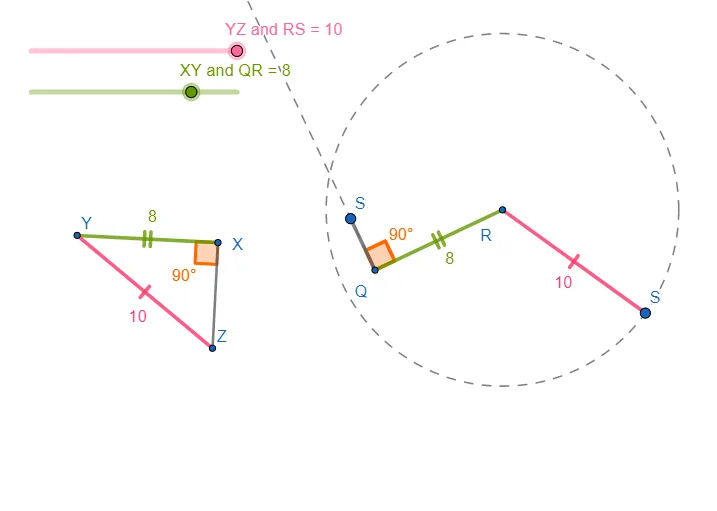
Triangle Congruency Exploration
This example dynamically demonstrates the geometric construction of a pyramid and its correlation with function graphs. It involves core mathematical concepts such as solid geometry, functions, rotation, and conditional probability. The construction utilizes GeoGebra commands and objects like Circle, Point, Segment, Rotate, Angle, Ray, and Intersect. Suitable for high school and above learners to visually understand the relationship between spatial geometry and functions.
GeoGebra Commands & Parameters
Circle(A, l) → cPoint(c) → BSegment(A, B) → fRotate(B, 90°, A) → B'Angle(B, A, B') → αRay(A, B') → gCircle(B, h) → dPoint(d) → DSegment(B, D) → h_{1}Point(g) → CSegment(A, C) → iCircle(E, l) → ePoint(e) → FSegment(E, F) → jCircle(F, h) → kRotate(F, 90°, E) → F'Angle(F, E, F') → βRay(E, F') → l_{1}Intersect(k, l_{1}, 1) → GSegment(F, G) → mSegment(E, G) → n
AI Drawing Prompt Reference
Draw a geometric diagram exploring a pyramid-like construction linked to function behavior. Start with a circle centered at a point A with radius l, pick a point B on the circle, and draw the segment AB. Rotate B by 90 degrees around A to get B′, then form the angle ∠BAB′ and draw the ray from A through B′. Next, construct a circle centered at B with radius h, choose a point D on it, and draw segment BD. From the ray position, take a point C and draw segment AC. Build the second side similarly by using a circle centered at E with radius l, choose a point F on it, draw segment EF, rotate F by 90 degrees around E to get F′, mark ∠FEF′, and draw the ray from E through F′. Intersect this ray with the circle centered at F (radius h) to obtain a point G, then draw segments FG and EG to complete the structure.
The prompt above was compiled from the original drawing commands and is for reference only.