
Visualizing Interior and Exterior Angles
Loading the math board and drawing, please wait…
In collections
About angles in a triangle
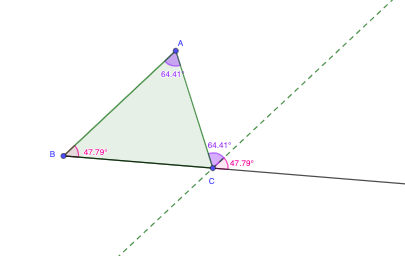
This example demonstrates how to construct and visually explore the relationship between interior and exterior angles at a vertex in a polygonal setting (often discussed via triangle cases). The main mathematical ideas include the definition of interior/exterior angles, measuring and comparing angles, and using geometric construction to maintain consistent angle placement so the relation becomes visually verifiable. Construction-wise, it leverages GeoGebra commands Polygon, Ray, Line, Angle, Intersect, and Mirror to build the figure and the angle annotations (key points such as A, B, C and labeled angles like α, β, γ, δ), using intersections to anchor rays/lines and mirror to obtain the corresponding exterior configuration. Suitable for middle/high-school geometry instruction, classroom demonstrations, and GeoGebra geometry construction practice.
GeoGebra Commands & Parameters
Polygon(A, B, C) → t1, c, a, bRay(B, C) → fLine(C, c) → gAngle(A, B, C) → αLine(A, f) → hIntersect(g, h) → DMirror(B, C) → B'Angle(B', C, D) → βAngle(B, A, C) → γAngle(A, C, D) → δ
AI Drawing Prompt Reference
Draw a triangle ABC, draw a ray BC from point B, draw a line from point C intersecting at A, label the interior angle α, draw a line from A intersecting the extension of ray BC, mark the intersection point as D, mirror point B around C to get B', label ∠B'CD as β, label ∠BAC as γ, and label ∠CAD as δ.
The prompt above was compiled from the original drawing commands and is for reference only.