
GeoGebra Geometric Construction and Trigonometry Application by Tim Brzezinski
Loading the math board and drawing, please wait…
In collections
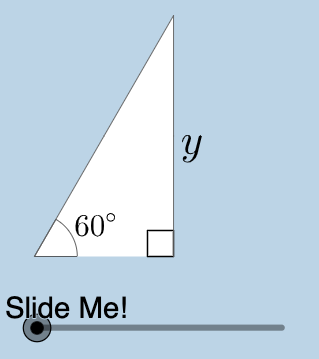
Special Right Triangle (2): Thinking Classroom Exploration
This example demonstrates how to use GeoGebra for geometric construction and apply trigonometry to analyze triangle properties. Key mathematical concepts include triangles, trigonometry, geometric transformations, and probability. Construction involves using commands like Center, Rotate, Intersect, and objects such as Midpoint, Angle, and Polygon. Suitable for middle or high school mathematics teaching to understand practical applications of geometry and trigonometry.
GeoGebra Commands & Parameters
Center(c) → ARotate(B, pi / 3, A) → B'_1Intersect(h, i) → CMidpoint(A, B'_1) → JAngle(B, A, B'_1) → βRotate(B, pi / 4, A) → B'_2Angle(B, A, B'_2) → γIntersect(g, i) → DPolygon(A, D, B'_2) → poly2, b'_2, a_2, dPolygon(A, C, B'_1) → poly3, b'_1, a_3, c_1Dilate(A, If[0 < a ≤ 1, 1 - a, 0], J) → A'_1Segment(A, A'_1) → kDilate(J, If[1 < a ≤ 2, 2 - a, 0], B'_1) → F'CircleArc(A, B'_1, B) → pTextfield(r) → InputBox1Segment(J, F') → mMidpoint(C, B'_1) → KDilate(C, If[0 < a ≤ 1, 1 - a, 0], K) → C'Dilate(K, If[1 < a ≤ 2, 2 - a, 0], B'_1) → K'Segment(C, C') → jSegment(K, K') → lAngle(B'_1, C, A) → αDilate(A, If[2 < a ≤ 3, 3 - a, 0], C) → A'Segment(A, A') → nRotate(A, If[3.5 < a ≤ 4.5, ((a - 3.5) * pi / 3), pi / 3], A) → A'_3Rotate(A', If[3.5 < a ≤ 4.5, ((a - 3.5) * pi / 3), pi / 3], A) → A''Segment(A'_3, A'') → n'Rotate(A'_3, If[4.5 < a ≤ 5.5, ((a - 4.5) * pi), pi], J) → FRotate(A'', If[4.5 < a ≤ 5.5, ((a - 4.5) * pi), pi], J) → A'''Segment(F, A''') → n''CircleArc(A, B, B'_1) → qRotateText(text4, ((-pi)) / 2) → text6Mirror(A, j) → A'_{2}Mirror(C, j) → C'_{1}Mirror(B'_1, j) → EPolygon(A'_{2}, C'_{1}, E) → poly3', e, a'_{2}, c'_{1}Mirror((0, 0), A') → GRotate((0, 0), (-(pi / 3)), G) → HMirror(F, l) → F'_{1}Mirror(A''', l) → ISegment(F'_{1}, I) → n'''Mirror(A'_3, j) → LMirror(A'', j) → A'''_{1}Segment(L, A'''_{1}) → n''_{1}Mirror(A, j) → A'_{4}Mirror(A', j) → A''_{1}Segment(A'_{4}, A''_{1}) → n'_{1}Angle(N, M, (0, 0)) → δ
AI Drawing Prompt Reference
Draw a triangle ABC, then rotate point B around point A to generate two new points B'1 and B'2. Construct triangles AB'C and AB'_1C. Use the midpoint J of A and B'1, and the angle β between A and B'1, to perform a series of rotations, dilations, and reflections to generate multiple new points and segments, ultimately forming several new triangles and polygons to demonstrate the properties and transformations of triangles.
The prompt above was compiled from the original drawing commands and is for reference only.