
Two-Way Table Conditional Probability Demo
Loading the math board and drawing, please wait…
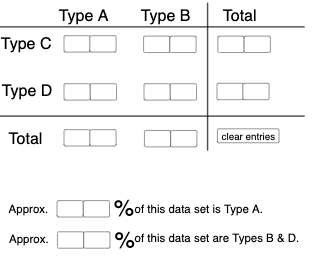
This example demonstrates the calculation and visualization of conditional probability using an interactive two-way table. It involves core concepts like conditional probability, probability & statistics, and data visualization. Constructed with GeoGebra commands like Textfield, Sequence, If, Segment, Translate, and objects such as segments and text fields. Ideal for high school mathematics education to help students understand the application of conditional probability in statistics.
GeoGebra Commands & Parameters
Textfield(a) → InputBox1Textfield(b) → InputBox2Textfield(c) → InputBox3Textfield(d) → InputBox4Textfield(f) → InputBox6Textfield(g) → InputBox7Textfield(h) → InputBox8Textfield(i) → InputBox9Textfield(j) → InputBox10Textfield(k) → InputBox11Textfield(l) → InputBox12Textfield(m) → InputBox13Textfield(n) → InputBox14Textfield(o) → InputBox15Textfield(p) → InputBox16Textfield(q) → InputBox17Sequence(CountIf[x ≟ i, l1], i, 0, 9, 1) → l2, {0, 0, 0, 0, 0, 0, 0, 0, 0, 0}If(c1, "√", "X") → text2If(c2, "√", "X") → text3If(c3, "√", "X") → text4If(c4, "√", "X") → text5Segment((-5, 0), (12, 0)) → rTranslate(r, Vector[(0, 4.35)]) → r'Segment((7.3, -1.65), (7.3, 5.5)) → sIf(Max[l2] ≥ 4, "At least one digit occurs more than 3 times!", "Each digit occurs at most 3 times.") → text1Textfield(a_1) → InputBox5Textfield(a_2) → InputBox18If(c5, "√", "X") → text6Textfield(t) → InputBox19Textfield(u) → InputBox20If(c6, "√", "X") → text11
AI Drawing Prompt Reference
Create an interactive two-way table to demonstrate the calculation and visualization of conditional probability, with multiple input boxes for data entry, a horizontal segment below, and a vertical segment above. Display checkmarks or crosses in the table based on input data, and show different text prompts based on conditions.
The prompt above was compiled from the original drawing commands and is for reference only.