
Line Reflection Quiz: Mirror Checks in Coordinate Geometry
Loading the math board and drawing, please wait…
In collections
Translations, Rotations, Reflections Exercises
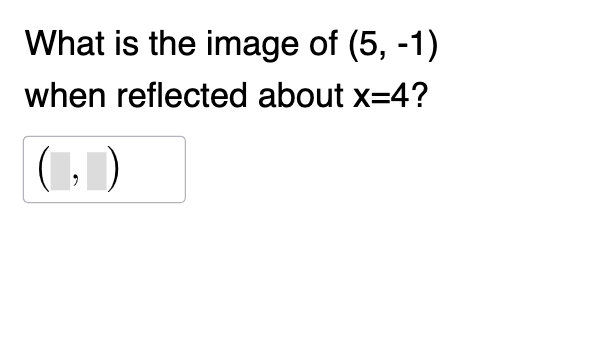
This GeoGebra example demonstrates how to perform line reflection (mirroring) in the coordinate plane and uses interactive quiz questions to check whether the reflected answers are correct. It focuses on key ideas such as line reflection symmetry, the relationship between a point and its mirror image, and coordinate geometry reasoning; it also aligns with the use of midline-style symmetry thinking and inequality/number-judgment style practice in randomly generated problems. The construction is driven by these commands and objects: Random to generate question parameters, If to branch into correct/incorrect feedback logic, Mirror to compute the reflected point geometry, and Textfield to display user-facing prompts and input guidance. The objects include generated parameters (n, a), reference/constructed coordinates (xC, yC), the reflecting line representation (d, f, A, A'), related point labels (b, c, B, C), plus an input box (InputBox1) and evaluation variables (correct, text1/text2/text3). Suitable for middle and high school learners to practice geometric transformations, especially reflection properties in coordinate settings, and for classroom or self-study quiz activities.
GeoGebra Commands & Parameters
Random(-8, 8) → aRandom(-8, 8) → xCRandom(-8, 8) → yCRandom(-10, 10) → dIf(n ≟ 1, y = 0, n ≟ 6, y = a, n ≟ 7, x - y = d, n ≟ 8, x + y = d, n ≟ 2, x = 0, n ≟ 3, y = x, n ≟ 4, y = (-x), n ≟ 5, x = a) → fMirror(A, f) → A'Textfield(C) → InputBox1If(n ≟ 1, "the xAxis", n ≟ 6, "y=" + a, n ≟ 7, ("x-y= " * d), n ≟ 8, ("x+y = " * d), n ≟ 2, "the yAxis", n ≟ 3, "y = x", n ≟ 4, "y=-x", n ≟ 5, "x=" + a) → text1If(correct, "√", "X") → text3
AI Drawing Prompt Reference
Draw a line segment AB and its reflection A'B' on a coordinate plane with respect to a given line. First, randomly generate the x-coordinate and y-coordinate of point A and the equation of the reflection line. Then, based on the type of the line (e.g., x-axis, y-axis, y=x, y=-x, etc.), determine the specific form of the reflection line. Next, calculate the reflection point A' of point A with respect to this line. Finally, display the equation of the reflection line in an input box and check if the user's input for the reflection point is correct.
The prompt above was compiled from the original drawing commands and is for reference only.