
More Movement: Lines and Centroid/Barycenter Geometry
Loading the math board and drawing, please wait…
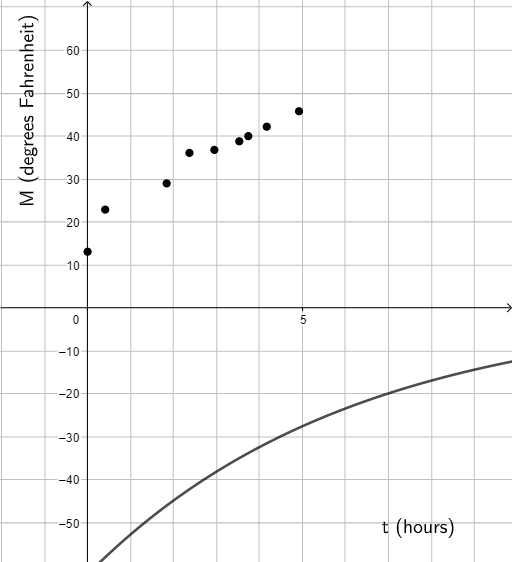
This example uses a “more movement” (dynamic variation) setup to demonstrate how the centroid/barycenter of a point configuration updates as elements move or as parameters change. It emphasizes the relationship between straight lines and the evolving centroid position, linking the motion to function-based visualization and interval-style uncertainty (confidence interval intuition). The main concepts include straight lines (with constructed auxiliary lines and intersections), the centroid/barycenter of a set of points, and functional/graphing representations (Functions) to connect geometry with data/interval ideas. Construction-wise, the GeoGebra setup includes text labels (text1, text2), a centroid point G, multiple moving point families (A1–A12 and B1–B12), auxiliary points A and B, and many supporting line objects (D2–D12), with parameters a and b driving the animation/interaction. The design is appropriate for middle/high school and early university learners, especially for dynamic geometry lessons, interactive demonstrations of centroid properties, and introductory statistical interval visualization.
GeoGebra Commands & Parameters
G(t) = (-62 * 0.85^(t))013.10.411.842.372.953.533.744.174.922.775.722.92936.136.838.84042.245.852.347.1(A2, B2)(A3, B3)(A4, B4)(A5, B5)(A6, B6)(A7, B7)(A8, B8)(A9, B9)(A10, B10)(A11, B11)(A12, B12)Boolean a(true)Boolean b(true)Boolean c(true)Boolean d(true)Boolean e(true)Boolean h(true)Boolean i(true)Boolean j(true)Boolean k(true)Boolean l(false)Boolean m(true)
AI Drawing Prompt Reference
Create a dynamic geometry diagram showing how the centroid of a set of points moves as parameters change. Include a reference curve defined by an exponential decay function, and two symmetric columns of points connected by straight auxiliary lines. Mark the centroid with a prominent point that shifts as the points move. Add several toggle switches to control visibility of different elements. The overall layout emphasizes the relationship between lines and the centroid, with a visual hint of function graphing and interval variation.
The prompt above was compiled from the original drawing commands and is for reference only.