
Twisted Z Cube
Loading the math board and drawing, please wait…
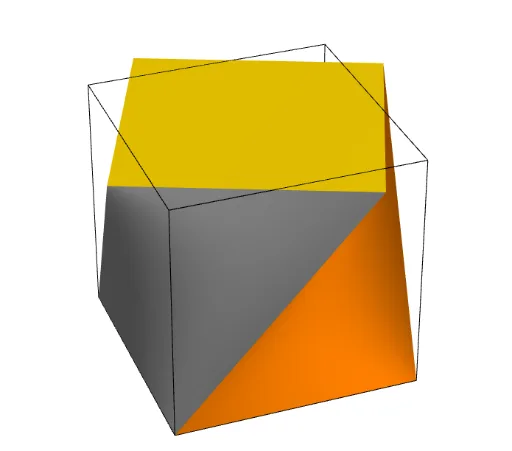
This example demonstrates a twisted z-cube. It involves solid geometry with rotation and surface construction. Using GeoGebra commands such as Point, CurveCartesian, Rotate, Surface, Cube, and Polygon, complex geometric shapes can be constructed. Suitable for high school or university solid geometry studies, as well as math enthusiasts interested in geometric transformations and 3D graphics.
GeoGebra Commands & Parameters
Point(Circle[(1, -1, -1), Distance[(-1, -1, -1), (1, -1, -1)], Segment[(-1, -1, -1), (1, -1, -1)]]) → ACurveCartesian(G + (t * (H - G)), t, 0, 1) → jCurveCartesian(B + (t * (C - B)), t, 0, 1) → aRotate(a, n, zAxis) → bSurface((u * x(b(t))) + ((1 - u) * x(j(t))), (u * y(b(t))) + ((1 - u) * y(j(t))), (u * z(b(t))) + ((1 - u) * z(j(t))), t, 0, 1, u, 0, 1) → cRotate(c, π / 2) → c'Rotate(c, (2 * π / 2)) → c'_1Rotate(c, (3 * π / 2)) → c'_2Point(Circle[H, Distance[G, H], Segment[G, H]]) → DCube(G, H, D) → d, E, faceDEKJ, faceFIJK, edgeEG, edgeGH, edgeDH, edgeDE, edgeFG, edgeEK, edgeFK, edgeFI, F, edgeHI, edgeIJ, edgeDJ, edgeJK, I, J, K, faceDEGH, faceEGFK, faceFGHI, faceDHIJRotate(Polygon[B, C, J, K], n) → q1Polygon(E, G, H, D) → q2, e, g, h, d_1