
Trig Identity via Areas (2): Dynamic Illustrator
Loading the math board and drawing, please wait…
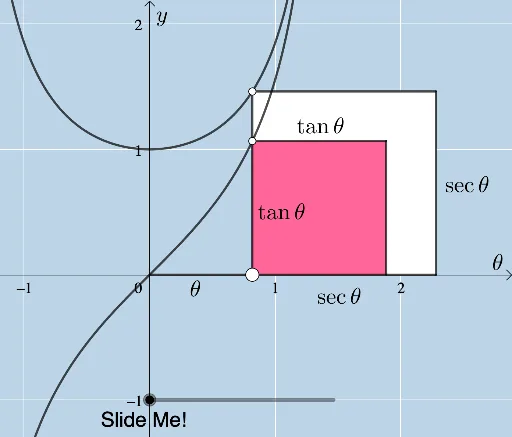
This GeoGebra example dynamically illustrates a trigonometric identity through area relationships in the unit circle. It demonstrates how the two sides of the identity correspond to equal areas of constructed polygons, using reflection and rotation to map regions. Core mathematical concepts include trigonometric functions (sine, cosine), unit circle, area, reflection, and transformation. The construction employs commands such as Point, Circle, Polygon, Line, Intersect, OrthogonalLine, Distance, Segment, Dilate, Vector, Translate, Angle, and Rotate to build the unit circle, reflected lines, perpendiculars, polygons, and auxiliary segments. The interactive sliders and draggable points allow users to explore the dynamic equality of areas. Suitable for high school or early college students learning geometric proofs of trigonometric identities, and for teachers creating dynamic visual demonstrations.
GeoGebra Commands & Parameters
Point(Segment[(0, 0), (1, 0)]) → APolygon(C, A, 4) → poly1, h, i, j, k, E, FPolygon(D, A, 4) → poly2, l, m, n, p, G, HLine(C, F) → qIntersect(q, n) → ILine(D, H) → rOrthogonalLine(F, r) → sIntersect(r, s) → JDistance(E, G) → bLine(C, F) → tCircle(C, 1) → cIntersect(c, t, 2) → KIntersect(c, r) → L, MPolygon(E, G, I, F) → q1, e, g_1, i_1, f_1Polygon(C, I, H, D) → q2, c_1, i_2, h_1, dSegment(C, F) → j_1Segment(F, E) → k_1Segment(E, G) → l_1Segment(G, H) → m_1Segment(C, D) → n_1Segment(A, E) → p_1Segment(A, C) → q_1Dilate(D, If[0 < a ≤ 1, 1 - a, 0], L) → D'Vector(D, D') → uTranslate(H, u) → H'Polygon(D', C, I, H') → q3, d', c_2, i_3, h'Line(I, H') → b_1Line(C, L) → d_1OrthogonalLine(L, d_1) → e_1Intersect(b_1, e_1) → NDilate(H', If[2 < a ≤ 3, 3 - a, 0], N) → H''Vector(H', H'') → vTranslate(I, v) → I'Polygon(L, C, I', H'') → q4, l_2, c_3, i', h''Dilate(N, If[4 < a ≤ 5, 5 - a, 0], O) → N'Vector(N, N') → wTranslate(L, w) → L'Translate(C, w) → C'Translate(I', w) → I''Translate(H'', w) → H'''Polygon(L', C', I'', H''') → q4', l', c', i'', h'''Point(r_1) → PAngle(I, N, P) → αRotate(L', If[4 < a ≤ 5, ((a - 4) * α), α], H''') → L''Rotate(C', If[4 < a ≤ 5, ((a - 4) * α), α], H''') → C''Rotate(I'', If[4 < a ≤ 5, ((a - 4) * α), α], H''') → I'''Rotate(H''', If[4 < a ≤ 5, ((a - 4) * α), α], H''') → QPolygon(L'', C'', I''', Q) → q4'', l'', c'', i''', q_2Line(C, F) → t_1Circle(G, 1) → s_1Line(F, E) → a_1Intersect(s_1, a_1) → R, SDilate(E, If[6 < a ≤ 7, 7 - a, 0], S) → F'Vector(E, F') → u_1Translate(E, u_1) → E'Translate(F, u_1) → F'_1Polygon(I, F'_1, F', G) → q5, i_4, f'_1, f', g_2Distance(G, F') → oLine(I, F'_1) → f_2OrthogonalLine(S, f_2) → h_2Intersect(f_2, h_2) → TDilate(F'_1, If[9 < a ≤ 10, 10 - a, 0], T) → UVector(F'_1, U) → v_1Translate(A, v_1) → A'Translate(I, v_1) → I'_1Polygon(I'_1, U, S, G) → q6, i'_1, u_2, s_2, g_3Dilate(T, If[11 < a ≤ 12, 12 - a, 0], L'') → T'Vector(T, T') → w_1Translate(I'_1, w_1) → VTranslate(U, w_1) → U'Translate(S, w_1) → S'Translate(G, w_1) → G'Polygon(V, U', S', G') → q6', v_2, u', s', g'Point(f_2) → WPoint(p_2) → ZAngle(Z, T, W) → βRotate(V, If[11 < a ≤ 12, ((-(a - 11)) * β), (-β)], U') → V'Rotate(U', If[11 < a ≤ 12, ((-(a - 11)) * β), (-β)], U') → U''Rotate(S', If[11 < a ≤ 12, ((-(a - 11)) * β), (-β)], U') → S''Rotate(G', If[11 < a ≤ 12, ((-(a - 11)) * β), (-β)], U') → G''Polygon(V', U'', S'', G'') → q6'', v', u'', s'', g''Line(I, F'_1) → j_2Line(G, F') → k_2Segment(A, G) → m_2Segment(G, H) → n_2Segment(C, D) → r_2Segment(D, H) → t_2Segment((0, 0), A) → a_2
AI Drawing Prompt Reference
In the unit circle, draw two rays from the center intersecting the circle at two points, and place a point on each ray to form two squares. By reflecting and rotating, divide these squares into several polygonal regions with equal areas, visually demonstrating a trigonometric identity. Include auxiliary lines, perpendiculars, intersection points, and draggable sliders to dynamically adjust angles and positions, observing how the area relationships change.
The prompt above was compiled from the original drawing commands and is for reference only.