
Triangular Prism Cross Section Demo
Loading the math board and drawing, please wait…
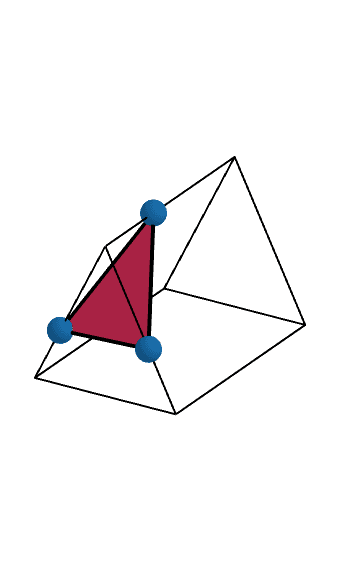
This example demonstrates various cross sections of a triangular prism by moving three points. It involves core math concepts like prisms, cross-sections, and polygon geometry. Constructed using commands like Segment, Intersect, Plane, Prism, and IntersectPath. Suitable for middle school and above students to understand solid geometry and cross-section transformations, ideal for teaching demonstrations.
GeoGebra Commands & Parameters
Segment(B, F) → BFSegment(E, F) → EFIntersect(EF, BF) → MIntersect(zAxis, EF) → LSegment(C, D) → CDSegment(B, C) → BCSegment(A, E) → AESegment(D, A) → DASegment(A, B) → ABSegment(E, D) → EDSegment(F, C) → FCPoint(list1) → IPoint(list1) → JPoint(list1) → KPlane(I, J, K) → PIntersect(ED, AE) → GIntersect(DA, AE) → HIntersect(ED, DA) → NIntersect(EF, BF) → RPrism(G, H, N, R) → BoundedPrism, O, edgeGN, edgeGR, edgeHO, edgeNQ, edgeOR, edgeOQ, edgeQR, Q, faceGHN, faceGHOR, faceHNQO, faceGNQR, faceOQR, edgeGH, edgeHNIntersectPath(P, BoundedPrism) → BoundedPolygon_1, S, e, T, U, V, W, a, b, c, d
AI Drawing Prompt Reference
Draw a triangular prism with movable points to demonstrate various cross-sections. Start by constructing a triangle and connecting the vertices to form the prism. Then, define a plane using three movable points and show the cross-section of the prism by the plane. The cross-section will change as the plane moves, displaying different polygon shapes to illustrate transformations.
The prompt above was compiled from the original drawing commands and is for reference only.