
Triangle Rotation Tessellation Step 5 Apply Design
Loading the math board and drawing, please wait…
In collections
Real Triangle Rotation Tessellation Math 206 by Marie Towne
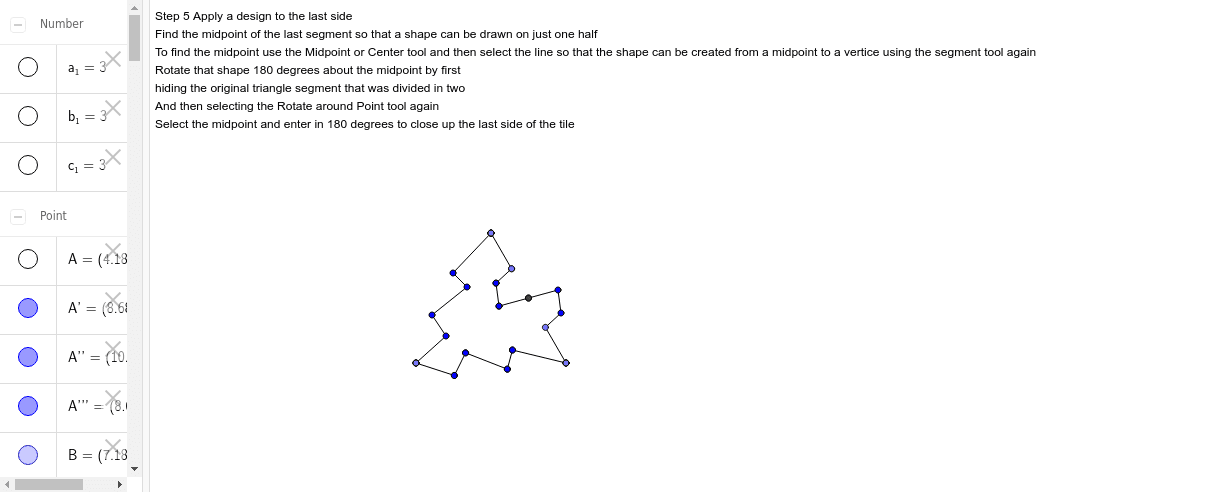
This example demonstrates how to create a tessellation pattern using triangle rotation in step 5, and applies a design to the last side. The core mathematical concepts include geometric transformations, specifically rotation. It uses GeoGebra commands such as Point, Segment, Rotate, and Midpoint for construction. Suitable for middle school and above students to learn about geometric transformations and tessellations.
GeoGebra Commands & Parameters
Point(Circle[A, 3]) → BSegment(A, B) → aPoint(Circle[B, 3]) → CSegment(B, C) → bPoint(Circle[C, 3]) → DSegment(C, D) → cRotate(A, -120*°, B) → A'Rotate(B, -120*°, B) → B'Segment(A', B') → a'Rotate(C, 120*°, C) → C'Rotate(D, 120*°, C) → D'Segment(C', D') → c'Segment(A', E) → dSegment(E, F) → eSegment(F, G) → fSegment(G, H) → gSegment(H, B) → hRotate(A', -60*°, B) → A''Rotate(E, -60*°, B) → E'Segment(A'', E') → d'Rotate(E, -60*°, B) → E'_1Rotate(F, -60*°, B) → F'Segment(E'_1, F') → e'Rotate(F, -60*°, B) → F'_1Rotate(G, -60*°, B) → G'Segment(F'_1, G') → f'Rotate(G, -60*°, B) → G'_1Rotate(H, -60*°, B) → H'Segment(G'_1, H') → g'Rotate(H, -60*°, B) → H'_1Rotate(B, -60*°, B) → B'_1Segment(H'_1, B'_1) → h'Rotate(B', -60*°, B) → B''Rotate(D', -60*°, B) → D''Midpoint(c') → ISegment(I, J) → iSegment(J, K) → jPoint(c') → LSegment(K, L) → kSegment(L, C) → lRotate(I, 180*°, I) → I'Rotate(J, 180*°, I) → J'Segment(I', J') → i'Rotate(J, 180*°, I) → J'_1Rotate(K, 180*°, I) → K'Segment(J'_1, K') → j'Rotate(K, 180*°, I) → K'_1Rotate(L, 180*°, I) → L'Segment(K'_1, L') → k'Rotate(L, 180*°, I) → L'_1Rotate(C, 180*°, I) → C'_1Segment(L'_1, C'_1) → l'Rotate(C', 180*°, I) → C''Rotate(A'', 180*°, I) → A'''Rotate(D'', 180*°, I) → D'''
AI Drawing Prompt Reference
Draw a tessellation pattern formed by rotating equilateral triangles. Start with an equilateral triangle, then use arcs centered at its vertices with radius equal to the side length to locate successive vertices, creating a chain of triangles. Rotate the first triangle by -120 degrees around one of its vertices, and rotate the second triangle by +120 degrees around its own vertex. Then rotate the resulting shapes by -60 degrees around a common vertex to create mirrored copies. On the final side, construct a polyline using its midpointaine, then rotate that polyline 180 degrees around the midpoint to add symmetric decoration. The overall pattern shows periodic rotational symmetry.
The prompt above was compiled from the original drawing commands and is for reference only.