
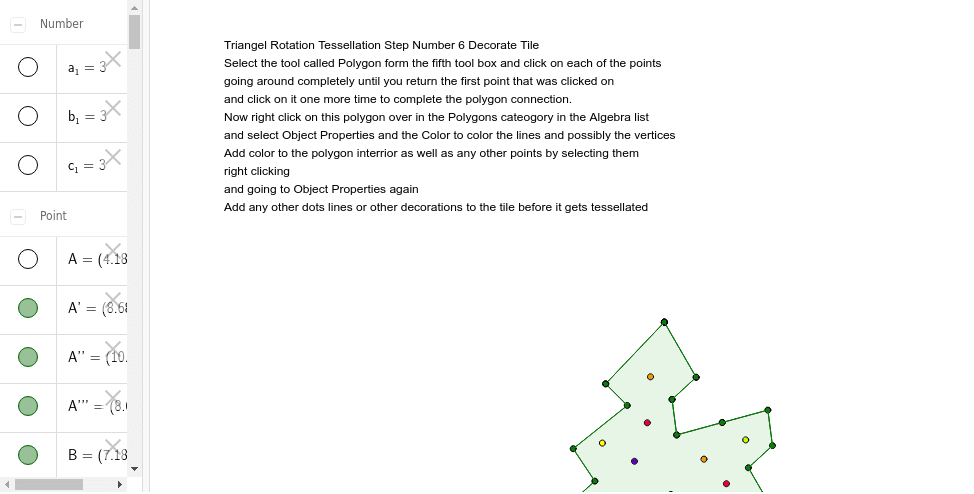
Triangle Rotation Tessellation Step 6 Decorate Tile
Loading the math board and drawing, please wait…
In collections
Real Triangle Rotation Tessellation Math 206 by Marie Towne
This example demonstrates the geometric transformation process of tessellating triangles through rotation. Core math concepts include rotation, trigonometric functions, polygons, congruence, and random variables. Construction highlights from the summary involve commands like Point, Segment, Rotate, Midpoint, Polygon, and Intersect, utilizing objects A, B, C, D, and their rotated counterparts. Suitable for high school mathematics education, illustrating geometric transformations and the generation of tessellation patterns.
GeoGebra Commands & Parameters
Point(Circle[A, 3]) → BSegment(A, B) → aPoint(Circle[B, 3]) → CSegment(B, C) → bPoint(Circle[C, 3]) → DSegment(C, D) → cRotate(A, -120*°, B) → A'Rotate(B, -120*°, B) → B'Segment(A', B') → a'Rotate(C, 120*°, C) → C'Rotate(D, 120*°, C) → D'Segment(C', D') → c'Segment(A', E) → dSegment(E, F) → eSegment(F, G) → fSegment(G, H) → gSegment(H, B) → hRotate(A', -60*°, B) → A''Rotate(E, -60*°, B) → E'Segment(A'', E') → d'Rotate(E, -60*°, B) → E'_1Rotate(F, -60*°, B) → F'Segment(E'_1, F') → e'Rotate(F, -60*°, B) → F'_1Rotate(G, -60*°, B) → G'Segment(F'_1, G') → f'Rotate(G, -60*°, B) → G'_1Rotate(H, -60*°, B) → H'Segment(G'_1, H') → g'Rotate(H, -60*°, B) → H'_1Rotate(B, -60*°, B) → B'_1Segment(H'_1, B'_1) → h'Rotate(B', -60*°, B) → B''Rotate(D', -60*°, B) → D''Midpoint(c') → ISegment(I, J) → iSegment(J, K) → jPoint(c') → LSegment(K, L) → kSegment(L, C) → lRotate(I, 180*°, I) → I'Rotate(J, 180*°, I) → J'Segment(I', J') → i'Rotate(J, 180*°, I) → J'_1Rotate(K, 180*°, I) → K'Segment(J'_1, K') → j'Rotate(K, 180*°, I) → K'_1Rotate(L, 180*°, I) → L'Segment(K'_1, L') → k'Rotate(L, 180*°, I) → L'_1Rotate(C, 180*°, I) → C'_1Segment(L'_1, C'_1) → l'Rotate(C', 180*°, I) → C''Rotate(A'', 180*°, I) → A'''Rotate(D'', 180*°, I) → D'''Polygon(A', E, C, L, K, J, I, J', K', L', F, G, H, B, H', G', F', E') → poly1, a'_1, e'_1, c_2, l_1, k_1, j_1, i_1, j'_1, k'_1, l'_1, e_1, f_1, g_1, h_1, b_2, h'_1, g'_1, f'_1Intersect(a'_1, e_1) → M
AI Drawing Prompt Reference
Draw a hexagonal tessellation pattern generated by rotating triangles. Start by drawing a circle with center A and radius 3 to get point B, then connect AB. Draw another circle with center B and radius 3 to get point C, then connect BC. Continue this process to get points D, E, F, G, and H. Rotate point A around B by -120 degrees to get A', and rotate point C around C by 120 degrees to get C', then connect A'C'. Continue with rotations and connections to form the hexagonal tessellation. Finally, add auxiliary lines like I to J, J to K, and K to L to create a more complex pattern.
The prompt above was compiled from the original drawing commands and is for reference only.