
Triangle Rotation Tessellation Step Number 7: Rotate Tile to Tessellate (1)
Loading the math board and drawing, please wait…
In collections
Real Triangle Rotation Tessellation Math 206 by Marie Towne
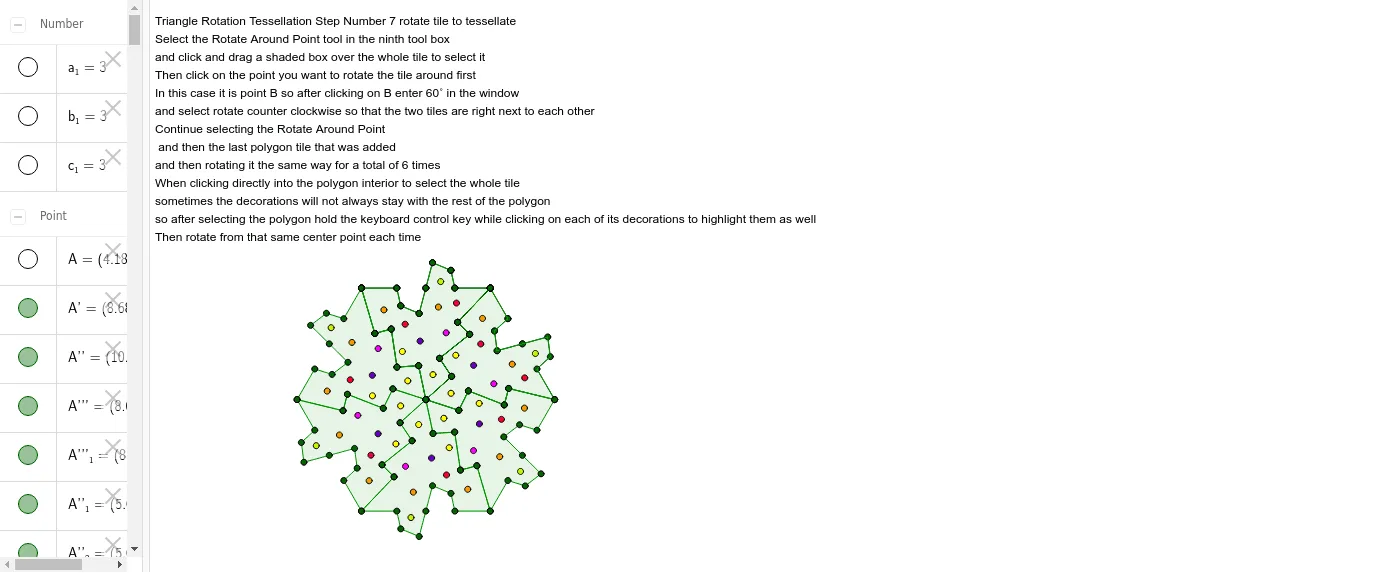
This example demonstrates the process of tessellating a plane by rotating a triangular tile. Key math concepts include rotation, geometric transformation, and polygon construction. It utilizes GeoGebra commands/objects like Point, Segment, Rotate, Midpoint, Polygon, and Intersect as outlined in the construction summary. Suitable for middle school and above students learning geometric transformations and the principles of tessellations.
GeoGebra Commands & Parameters
Point(Circle[A, 3]) → BSegment(A, B) → aPoint(Circle[B, 3]) → CSegment(B, C) → bPoint(Circle[C, 3]) → DSegment(C, D) → cRotate(A, -120*°, B) → A'Rotate(B, -120*°, B) → B'Segment(A', B') → a'Rotate(C, 120*°, C) → C'Rotate(D, 120*°, C) → D'Segment(C', D') → c'Segment(A', E) → dSegment(E, F) → eSegment(F, G) → fSegment(G, H) → gSegment(H, B) → hRotate(A', -60*°, B) → A''Rotate(E, -60*°, B) → E'Segment(A'', E') → d'Rotate(E, -60*°, B) → E'_1Rotate(F, -60*°, B) → F'Segment(E'_1, F') → e'Rotate(F, -60*°, B) → F'_1Rotate(G, -60*°, B) → G'Segment(F'_1, G') → f'Rotate(G, -60*°, B) → G'_1Rotate(H, -60*°, B) → H'Segment(G'_1, H') → g'Rotate(H, -60*°, B) → H'_1Rotate(B, -60*°, B) → B'_1Segment(H'_1, B'_1) → h'Rotate(B', -60*°, B) → B''Rotate(D', -60*°, B) → D''Midpoint(c') → ISegment(I, J) → iSegment(J, K) → jPoint(c') → LSegment(K, L) → kSegment(L, C) → lRotate(I, 180*°, I) → I'Rotate(J, 180*°, I) → J'Segment(I', J') → i'Rotate(J, 180*°, I) → J'_1Rotate(K, 180*°, I) → K'Segment(J'_1, K') → j'Rotate(K, 180*°, I) → K'_1Rotate(L, 180*°, I) → L'Segment(K'_1, L') → k'Rotate(L, 180*°, I) → L'_1Rotate(C, 180*°, I) → C'_1Segment(L'_1, C'_1) → l'Rotate(C', 180*°, I) → C''Rotate(A'', 180*°, I) → A'''Rotate(D'', 180*°, I) → D'''Polygon(A', E, C, L, K, J, I, J', K', L', F, G, H, B, H', G', F', E') → poly1, a'_1, e'_1, c_2, l_1, k_1, j_1, i_1, j'_1, k'_1, l'_1, e_1, f_1, g_1, h_1, b_2, h'_1, g'_1, f'_1Intersect(a'_1, e_1) → MRotate(A', 60*°, B) → A''_1Rotate(E, 60*°, B) → E'_2Segment(A''_1, E'_2) → d'_1Rotate(E, 60*°, B) → E'_3Rotate(F, 60*°, B) → F'_2Segment(E'_3, F'_2) → e'_2Rotate(F, 60*°, B) → F'_3Rotate(G, 60*°, B) → G'_2Segment(F'_3, G'_2) → f'_2Rotate(G, 60*°, B) → G'_3Rotate(H, 60*°, B) → H'_2Segment(G'_3, H'_2) → g'_2Rotate(H, 60*°, B) → H'_3Rotate(B, 60*°, B) → B'_2Segment(H'_3, B'_2) → h'_2Rotate(A'', 60*°, B) → A'''_1Rotate(E', 60*°, B) → E''Segment(A'''_1, E'') → d''Rotate(E'_1, 60*°, B) → WRotate(F', 60*°, B) → F''Segment(W, F'') → e''Rotate(F'_1, 60*°, B) → ZRotate(G', 60*°, B) → G''Segment(Z, G'') → f''Rotate(G'_1, 60*°, B) → A_1Rotate(H', 60*°, B) → H''Segment(A_1, H'') → g''Rotate(H'_1, 60*°, B) → B_1Rotate(B'_1, 60*°, B) → C_1Segment(B_1, C_1) → h''Rotate(I, 60*°, B) → I'_1Rotate(J, 60*°, B) → J'_2Segment(I'_1, J'_2) → i'_1Rotate(J, 60*°, B) → J'_3Rotate(K, 60*°, B) → K'_2Segment(J'_3, K'_2) → j'_2Rotate(K, 60*°, B) → K'_3Rotate(L, 60*°, B) → L'_2Segment(K'_3, L'_2) → k'_2Rotate(L, 60*°, B) → L'_3Rotate(C, 60*°, B) → C'_2Segment(L'_3, C'_2) → l'_2Rotate(I', 60*°, B) → I''Rotate(J', 60*°, B) → J''Segment(I'', J'') → i''Rotate(J'_1, 60*°, B) → D_1Rotate(K', 60*°, B) → K''Segment(D_1, K'') → j''Rotate(K'_1, 60*°, B) → E_1Rotate(L', 60*°, B) → L''Segment(E_1, L'') → k''Rotate(L'_1, 60*°, B) → F_1Rotate(C'_1, 60*°, B) → G_1Segment(F_1, G_1) → l''Rotate(B', 60*°, B) → B''_1Rotate(C', 60*°, B) → C''_1Rotate(D', 60*°, B) → D''_1Rotate(B'', 60*°, B) → B'''Rotate(D'', 60*°, B) → D'''_1Rotate(C'', 60*°, B) → C'''Rotate(A''', 60*°, B) → H_1Rotate(D''', 60*°, B) → I_1Rotate(A', 60*°, B) → A''_2Rotate(E, 60*°, B) → E'_4Rotate(F, 60*°, B) → F'_4Rotate(G, 60*°, B) → G'_4Rotate(H, 60*°, B) → H'_4Rotate(B, 60*°, B) → B'_3Rotate(H', 60*°, B) → H''_1Rotate(G', 60*°, B) → G''_1Rotate(F', 60*°, B) → F''_1Rotate(E', 60*°, B) → E''_1Rotate(C, 60*°, B) → C'_3Rotate(L, 60*°, B) → L'_4Rotate(K, 60*°, B) → K'_4Rotate(J, 60*°, B) → J'_4Rotate(I, 60*°, B) → I'_2Rotate(J', 60*°, B) → J''_1Rotate(K', 60*°, B) → K''_1Rotate(L', 60*°, B) → L''_1Polygon(A''_2, E'_4, C'_3, L'_4, K'_4, J'_4, I'_2, J''_1, K''_1, L''_1, F'_4, G'_4, H'_4, B'_3, H''_1, G''_1, F''_1, E''_1) → poly1', a''_2, e''_1, c'_3, l'_4, k'_4, j'_4, i'_2, j''_1, k''_1, l''_1, e'_4, f'_4, g'_4, h'_4, b'_3, h''_1, g''_1, f''_1Rotate(M, 60*°, B) → M'Rotate(N, 60*°, B) → N'Rotate(O, 60*°, B) → O'Rotate(P, 60*°, B) → P'Rotate(Q, 60*°, B) → Q'Rotate(R, 60*°, B) → R'Rotate(S, 60*°, B) → S'Rotate(T, 60*°, B) → T'Rotate(U, 60*°, B) → U'Rotate(V, 60*°, B) → V'Rotate(N', 60*°, B'_2) → N''Rotate(A''_2, 60*°, B'_2) → J_1Rotate(E'_4, 60*°, B'_2) → K_1Rotate(F'_4, 60*°, B'_2) → L_1Rotate(G'_4, 60*°, B'_2) → M_1Rotate(H'_4, 60*°, B'_2) → N_1Rotate(B'_3, 60*°, B'_2) → O_1Rotate(H''_1, 60*°, B'_2) → P_1Rotate(G''_1, 60*°, B'_2) → Q_1Rotate(F''_1, 60*°, B'_2) → R_1Rotate(E''_1, 60*°, B'_2) → S_1Rotate(C'_3, 60*°, B'_2) → T_1Rotate(L'_4, 60*°, B'_2) → U_1Rotate(K'_4, 60*°, B'_2) → V_1Rotate(J'_4, 60*°, B'_2) → W_1Rotate(I'_2, 60*°, B'_2) → Z_1Rotate(J''_1, 60*°, B'_2) → A_2Rotate(K''_1, 60*°, B'_2) → B_2Rotate(L''_1, 60*°, B'_2) → C_2Polygon(J_1, K_1, T_1, U_1, V_1, W_1, Z_1, A_2, B_2, C_2, L_1, M_1, N_1, O_1, P_1, Q_1, R_1, S_1) → poly1'', j_2, s_1, t_1, u_1, v_1, w_1, z_1, a_2, b_3, c_3, k_2, l_2, m_1, n_1, o_1, p_1, q_1, r_1Rotate(U', 60*°, B'_2) → U''Rotate(Q', 60*°, B'_2) → Q''Rotate(S', 60*°, B'_2) → S''Rotate(R', 60*°, B'_2) → R''Rotate(O', 60*°, B'_2) → O''Rotate(T', 60*°, B'_2) → T''Rotate(P', 60*°, B'_2) → P''Rotate(J_1, 60*°, B'_2) → D_2Rotate(K_1, 60*°, B'_2) → E_2Rotate(L_1, 60*°, B'_2) → F_2Rotate(M_1, 60*°, B'_2) → G_2Rotate(N_1, 60*°, B'_2) → H_2Rotate(O_1, 60*°, B'_2) → I_2Rotate(P_1, 60*°, B'_2) → J_2Rotate(Q_1, 60*°, B'_2) → K_2Rotate(R_1, 60*°, B'_2) → L_2Rotate(S_1, 60*°, B'_2) → M_2Rotate(T_1, 60*°, B'_2) → N_2Rotate(U_1, 60*°, B'_2) → O_2Rotate(V_1, 60*°, B'_2) → P_2Rotate(W_1, 60*°, B'_2) → Q_2Rotate(Z_1, 60*°, B'_2) → R_2Rotate(A_2, 60*°, B'_2) → S_2Rotate(B_2, 60*°, B'_2) → T_2Rotate(C_2, 60*°, B'_2) → U_2Polygon(D_2, E_2, N_2, O_2, P_2, Q_2, R_2, S_2, T_2, U_2, F_2, G_2, H_2, I_2, J_2, K_2, L_2, M_2) → poly1''', d_2, m_2, n_2, o_2, p_2, q_2, r_2, s_2, t_2, u_2, e_2, f_2, g_2, h_2, i_2, j_3, k_3, l_3Rotate(Q'', 60*°, B'_2) → Q'''Rotate(U'', 60*°, B'_2) → U'''Rotate(N'', 60*°, B'_2) → N'''Rotate(R'', 60*°, B'_2) → R'''Rotate(S'', 60*°, B'_2) → S'''Rotate(O'', 60*°, B'_2) → O'''Rotate(P'', 60*°, B'_2) → P'''Rotate(T'', 60*°, B'_2) → T'''Rotate(D_2, 60*°, B'_2) → V_2Rotate(E_2, 60*°, B'_2) → W_2Rotate(F_2, 60*°, B'_2) → Z_2Rotate(G_2, 60*°, B'_2) → A_3Rotate(H_2, 60*°, B'_2) → B_3Rotate(I_2, 60*°, B'_2) → C_3Rotate(J_2, 60*°, B'_2) → D_3Rotate(K_2, 60*°, B'_2) → E_3Rotate(L_2, 60*°, B'_2) → F_3Rotate(M_2, 60*°, B'_2) → G_3Rotate(N_2, 60*°, B'_2) → H_3Rotate(O_2, 60*°, B'_2) → I_3Rotate(P_2, 60*°, B'_2) → J_3Rotate(Q_2, 60*°, B'_2) → K_3Rotate(R_2, 60*°, B'_2) → L_3Rotate(S_2, 60*°, B'_2) → M_3Rotate(T_2, 60*°, B'_2) → N_3Rotate(U_2, 60*°, B'_2) → O_3Polygon(V_2, W_2, H_3, I_3, J_3, K_3, L_3, M_3, N_3, O_3, Z_2, A_3, B_3, C_3, D_3, E_3, F_3, G_3) → poly2, v_2, g_3, h_3, i_3, j_4, k_4, l_4, m_3, n_3, o_3, w_2, z_2, a_3, b_4, c_4, d_3, e_3, f_3Rotate(P''', 60*°, B'_2) → P_3Rotate(N''', 60*°, B'_2) → Q_3Rotate(R''', 60*°, B'_2) → R_3Rotate(T''', 60*°, B'_2) → S_3Rotate(Q''', 60*°, B'_2) → T_3Rotate(U''', 60*°, B'_2) → U_3Rotate(O''', 60*°, B'_2) → V_3Rotate(S''', 60*°, B'_2) → W_3Rotate(V_2, 60*°, B'_2) → Z_3Rotate(W_2, 60*°, B'_2) → A_4Rotate(Z_2, 60*°, B'_2) → B_4Rotate(A_3, 60*°, B'_2) → C_4Rotate(B_3, 60*°, B'_2) → D_4Rotate(C_3, 60*°, B'_2) → E_4Rotate(D_3, 60*°, B'_2) → F_4Rotate(E_3, 60*°, B'_2) → G_4Rotate(F_3, 60*°, B'_2) → H_4Rotate(G_3, 60*°, B'_2) → I_4Rotate(H_3, 60*°, B'_2) → J_4Rotate(I_3, 60*°, B'_2) → K_4Rotate(J_3, 60*°, B'_2) → L_4Rotate(K_3, 60*°, B'_2) → M_4Rotate(L_3, 60*°, B'_2) → N_4Rotate(M_3, 60*°, B'_2) → O_4Rotate(N_3, 60*°, B'_2) → P_4Rotate(O_3, 60*°, B'_2) → Q_4Polygon(Z_3, A_4, J_4, K_4, L_4, M_4, N_4, O_4, P_4, Q_4, B_4, C_4, D_4, E_4, F_4, G_4, H_4, I_4) → poly2', z_3, i_4, j_5, k_5, l_5, m_4, n_4, o_4, p_4, q_4, a_4, b_5, c_5, d_4, e_4, f_4, g_4, h_4Rotate(P_3, 60*°, B'_2) → R_4Rotate(V_3, 60*°, B'_2) → S_4Rotate(S_3, 60*°, B'_2) → T_4Rotate(U_3, 60*°, B'_2) → U_4Rotate(T_3, 60*°, B'_2) → V_4Rotate(W_3, 60*°, B'_2) → W_4Rotate(Q_3, 60*°, B'_2) → Z_4Rotate(R_3, 60*°, B'_2) → A_5
AI Drawing Prompt Reference
Draw a tessellation pattern using a triangle rotated around each vertex. Start by drawing triangle ABC, then rotate it to create new triangles like A', B', and C'. Connect the vertices of these new triangles to form a more complex tessellation. Finally, use rotations and midpoints to construct additional line segments and refine the pattern.
The prompt above was compiled from the original drawing commands and is for reference only.