
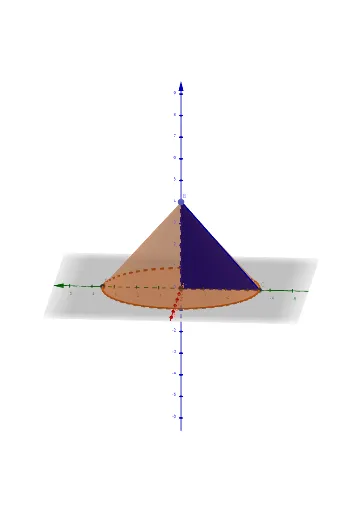
Triangle Inscribed in a Cone: 3D Geometric Construction
Loading the math board and drawing, please wait…
In collections
CLASS IX CBSE MATHS ACTIVITIES
① This example demonstrates how to construct a triangle inscribed inside a three-dimensional cone, illustrating the spatial relationship between a planar polygon and a curved surface. ② Core mathematical concepts include cone geometry, spatial point positioning, intersection of planes and surfaces, and polygon construction in 3D space. ③ Construction steps: use the Intersect command to find intersection points between the cone and auxiliary planes, Point to define vertices, Cone to create the solid, and Polygon to connect vertices into a triangle; key objects include points A, B, C, D and auxiliary lines/surfaces a, b, c, d. ④ Suitable for high school or early college students learning solid geometry, enhancing spatial visualization, and for math lab activities exploring dynamic 3D constructions.
GeoGebra Commands & Parameters
Intersect(xAxis, zAxis) → APoint(zAxis) → BCone(A, B, a) → b, c, dIntersect(yAxis, d) → C, DPolygon(B, A, C) → t1, c_1, b_1, a_1Cone(A, B, a) → e, f, g
AI Drawing Prompt Reference
Draw a triangle inscribed in a cone in 3D. First, find the intersection point A between the cone and an auxiliary plane. Then define point B on the Z-axis. Create a cone with parameters A, B, and auxiliary plane a to form surfaces b, c, and d. Next, find the intersection points C and D between the y-axis and surface d. Finally, construct triangle t1 using points B, A, and C.
The prompt above was compiled from the original drawing commands and is for reference only.