
Tangram Side Lengths: Pythagorean Theorem Application
Loading the math board and drawing, please wait…
In collections
MateTangram
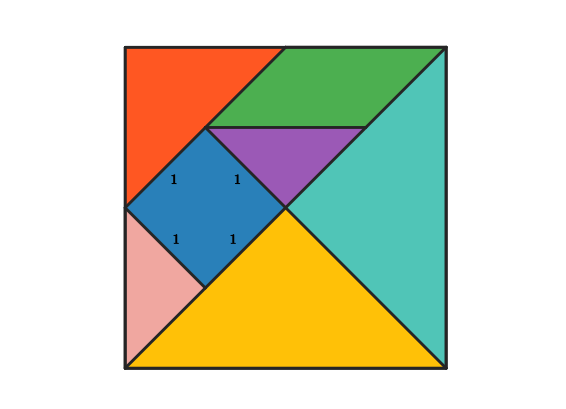
This example demonstrates how to calculate the side lengths of all seven pieces in a Tangram puzzle. By setting the square's side length as unit 1, the Pythagorean theorem is applied to find the leg and hypotenuse lengths of large, small, and medium triangles, as well as the side relationships of parallelograms and the square. Construction uses GeoGebra commands: Polygon for drawing polygons, Segment for labeling sides, Line for auxiliary lines, Intersect for finding intersections, Rotate for piece rotation and assembly, and Midpoint for locating midpoints. Core math concepts include right triangle leg-hypotenuse relationships, isosceles triangle properties, parallelogram opposite side equality, and square angle-side relationships. Ideal for middle school students learning the Pythagorean theorem and for geometry teachers demonstrating mathematical principles behind Tangram puzzles.
GeoGebra Commands & Parameters
Polygon(A, B, 4) → poli1, frame3, frame4, frame1, frame2, C, DSegment(A, C) → frame12Midpoint(D, C) → EMidpoint(D, A) → FSegment(F, E) → frame5Midpoint(A, C) → GSegment(B, G) → frame9Midpoint(F, E) → HMidpoint(G, C) → ISegment(H, I) → frame7Segment(G, H) → frame8Line(F, frame8) → jIntersect(j, frame12) → JSegment(F, J) → frame11Polygon(A, G, B) → poli2, b_1, a_1, g_1Rotate(O + (a_1, 0), Angle[B - G] + Angle[O - N] - Angle[G - A], O) → PPolygon(N, O, P) → poli4, p, n, oPolygon(B, G, C) → poli3, c_1, b_2, g_2Rotate(L + (b_2, 0), Angle[C - G] + Angle[L - K] - Angle[G - B], L) → MPolygon(K, L, M) → poli5, m, k_1, lPolygon(H, E, C, I) → poli6, h_1, e_1, c_2, i_1Rotate(R + (e_1, 0), Angle[C - E] + Angle[R - Q] - Angle[E - H], R) → SRotate(S + (c_2, 0), Angle[I - C] + Angle[S - R] - Angle[C - E], S) → TPolygon(Q, R, S, T) → poli7, q, r, s, tPolygon(H, G, I) → poli8, i_2, h_2, g_3Rotate(V + (h_2, 0), Angle[I - G] + Angle[V - U] - Angle[G - H], V) → WPolygon(U, V, W) → poli9, w, u, vPolygon(F, H, G, J) → poli10, f_1, h_3, g_4, j_1Rotate(A_1 + (h_3, 0), Angle[G - H] + Angle[A_1 - Z] - Angle[H - F], A_1) → B_1Rotate(B_1 + (g_4, 0), Angle[J - G] + Angle[B_1 - A_1] - Angle[G - H], B_1) → C_1Polygon(Z, A_1, B_1, C_1) → poli11, z, a_2, b_3, c_3Polygon(F, J, A) → poli12, a_3, f_2, j_2Rotate(E_1 + (f_2, 0), Angle[A - J] + Angle[E_1 - D_1] - Angle[J - F], E_1) → F_1Polygon(D_1, E_1, F_1) → poli13, f_3, d_1, e_2Polygon(F, D, E) → poli14, e_3, f_4, d_2Rotate(H_1 + (f_4, 0), Angle[E - D] + Angle[H_1 - G_1] - Angle[D - F], H_1) → I_1Polygon(G_1, H_1, I_1) → poli15, i_3, g_5, h_4
AI Drawing Prompt Reference
Draw a square frame, then use the Pythagorean theorem to calculate the side lengths of large, small, and medium triangles, as well as the side relationships of parallelograms and the square. Start by drawing the square frame, then draw auxiliary lines and midpoints, and finally construct each piece of the tangram puzzle through rotation and midpoint construction.
The prompt above was compiled from the original drawing commands and is for reference only.