
Construction of Tangents to a Circle
Loading the math board and drawing, please wait…
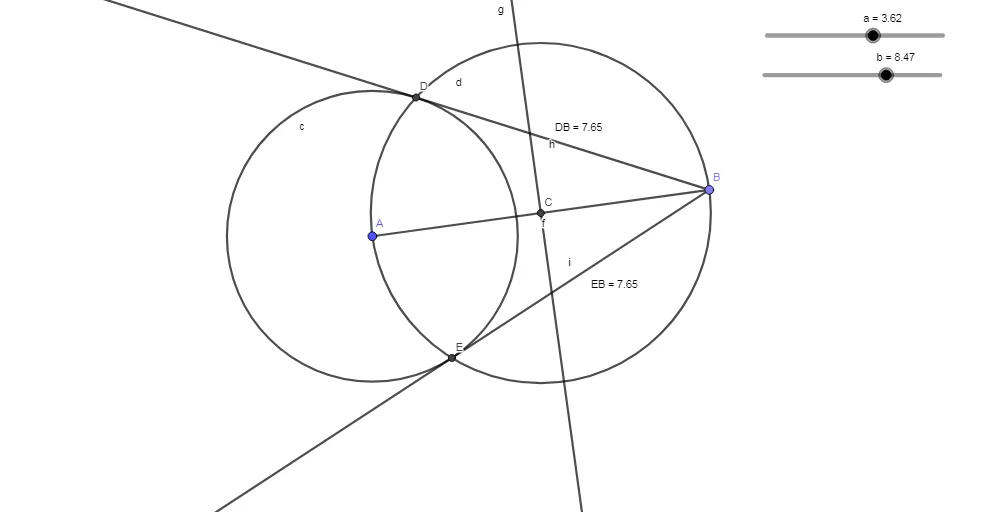
①This example demonstrates how to construct tangents to a circle from an external point using geometric construction steps, showing the complete process of drawing two tangent lines.②Core mathematical concepts include the tangent property (perpendicular to radius at point of tangency), perpendicular bisectors, and the use of auxiliary circles to locate tangent points.③Construction details: Based on the summary, the GeoGebra commands used are Circle, Point, Segment, LineBisector, Intersect, Ray, and Distance; objects include circle a, center A, radius b, auxiliary circle c, tangent points B, tangent lines f and g, intersection points C, D, E, and distance measurements distanceDB and distanceEB. The method constructs an auxiliary circle with diameter from the center to the external point, intersects it with the given circle to find tangent points, then connects the external point to these points.④This is suitable for high school geometry or analytic geometry courses, for learning tangent properties and compass-straightedge constructions, and can be used by teachers for demonstrations or by students for independent exploration of the geometric reasoning behind tangent construction.
GeoGebra Commands & Parameters
Circle(A, a) → cPoint(Circle[A, b]) → BSegment(A, B) → fLineBisector(A, B) → gIntersect(g, f) → CCircle(C, B) → dIntersect(c, d) → D, E, ,Ray(B, D) → hRay(B, E) → iDistance(D, B) → distanceDBDistance(E, B) → distanceEB
AI Drawing Prompt Reference
Draw a circle with center A and radius b. Construct two tangents from an external point C to the circle, finding the tangent points B. Draw an auxiliary circle through B, intersecting the original circle to find another tangent point E. Connect C to B and E, and draw rays from C to B and E. Measure the distances from C to B and E.
The prompt above was compiled from the original drawing commands and is for reference only.