
Dividing a Line Segment in a Given Ratio
Loading the math board and drawing, please wait…
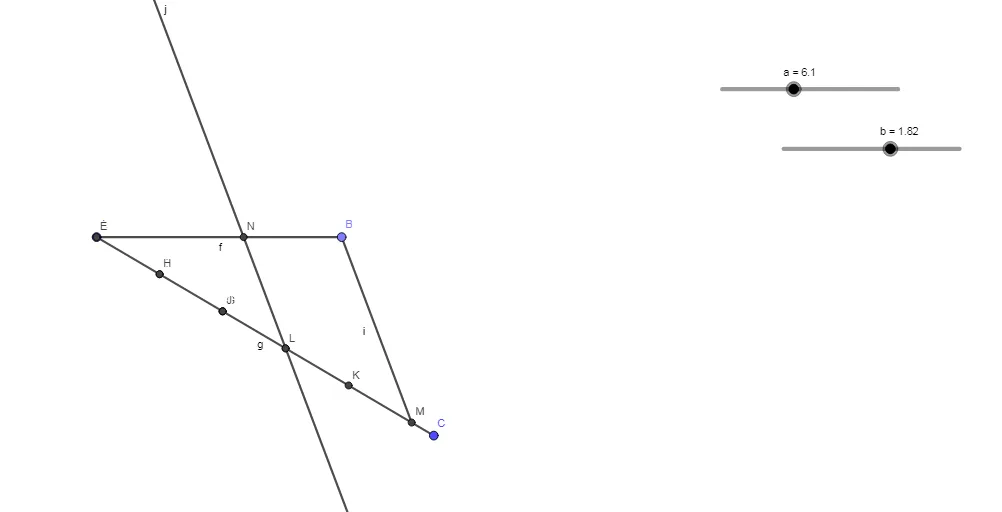
This example demonstrates how to divide a line segment into a given ratio using geometric construction. The core mathematical concepts involve ratio, similarity transformation, and proportional division. The construction uses GeoGebra commands such as Point, Segment, Circle, Intersect, and Line, with objects like segment a, points A and B, and auxiliary circles f and g to locate intersection points C, D, E, etc., which determine the division point. It is suitable for middle school and above to explore geometric construction, similarity, and ratio properties, and can be used for dynamic investigation of how changing the ratio affects the division point.
GeoGebra Commands & Parameters
Point(Circle[A, a]) → BSegment(A, B) → fSegment(A, C) → gCircle(A, b) → cIntersect(c, g) → D,Circle(D, b) → dIntersect(d, g) → E, FIntersect(d, g, 2) → GCircle(F, b) → eIntersect(e, g) → H, ICircle(I, b) → hIntersect(h, g) → J, KCircle(K, b) → kIntersect(k, g) → L, MSegment(B, M) → iLine(I, i) → jIntersect(f, j) → N
AI Drawing Prompt Reference
Construct a geometric division of a line segment in a given ratio using an iterative circle–intersection method. Start with the segment’s endpoints, build an auxiliary segment from one endpoint to the first constructed intersection point, and draw two circles centered at the appropriate points using the same given radius. Intersect each new circle with the fixed auxiliary circle to generate successive points along the construction. Continue creating circles centered at these intersection points and intersecting them again with the same auxiliary circle to obtain additional auxiliary points. Then connect the chosen auxiliary point to the opposite endpoint, draw a line through the key intermediate point to intersect the earlier constructed segment line, and take that intersection as the division point along the original segment.
The prompt above was compiled from the original drawing commands and is for reference only.