
Measuring Angles Formed by Parallel Lines and a Transversal
Loading the math board and drawing, please wait…
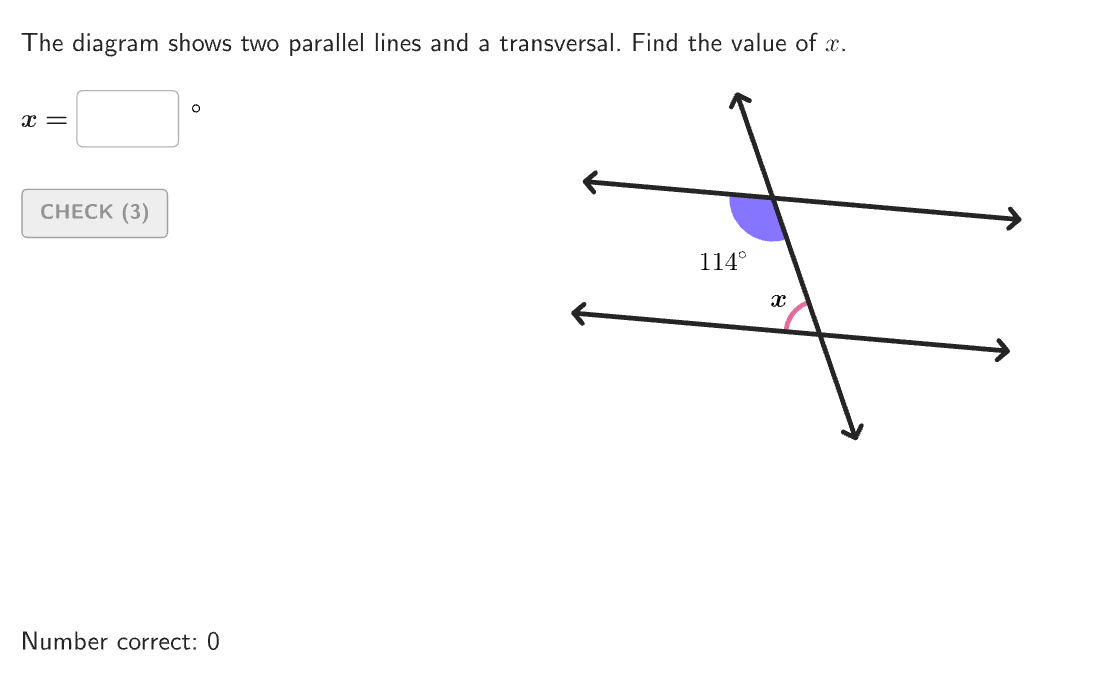
This example demonstrates how to determine the measures of angles formed by parallel lines and a transversal by applying the relationships between angle pairs. It covers angle relationships such as corresponding angles, alternate interior angles, same-side interior angles, and vertical angles. Using GeoGebra commands like Sequence, Take, Segment, etc., it dynamically illustrates these angle relationships. Suitable for 6-8 grade students to learn about angles and congruence in geometry.
GeoGebra Commands & Parameters
Sequence(Random[0, 99] / 100, A, 1, 200) → allRandomSeeds, {0.51, 0.38, 0.7, 0.31, 0.1, 0.13, 0.6, 0.77, 0.58, 0.9, 0.4, 0.36, 0.98, 0.81, 0.29, 0.74, 0.73, 0.34, 0.67, 0.84, 0, 0.59, 0.42, 0.08, 0.72, 0.35, 0.33, 0.02, 0.38, 0.23, 0.35, 0.75, 0.64, 0.4, 0.98, 0.15, 0.88, 0.62, 0.69, 0.74, 0.93, 0.94, 0.04, 0.13, 0.74, 0.32, 0.11, 0.63, 0.04, 0.07, 0.43, 0.23, 0.33, 0.93, 0.98, 0.77, 0.66, 0.99, 0.74, 0.57, 0.09, 0.1, 0.48, 0.87, 0.07, 0.05, 0.15, 0.98, 0.61, 0.15, 0.2, 0.44, 0.87, 0.28, 0.34, 0.6, 0.5, 0.16, 0.91, 0.47, 0.92, 0.4, 0.66, 0.07, 0.14, 0.02, 0.61, 0.9, 0.89, 0.71, 0.35, 0.11, 0.86, 0.72, 0.53, 0.32, 0.48, 0.46, 0.34, 0.93, 0.6, 0.48, 0.08, 0.76, 0.48, 0.12, 0.07, 0.47, 0.54, 0.97, 0.79, 0.9, 0.39, 0.52, 0.05, 0.49, 0.24, 0.12, 0.56, 0.35, 0.53, 0.8, 0.56, 0.44, 0.21, 0.17, 0.48, 0.94, 0.07, 0.18, 0.97, 0.19, 0.22, 0.72, 0.35, 0.63, 0.72, 0.62, 0.42, 0.1, 0.37, 0.06, 0.69, 0.48, 0.11, 0.71, 0.95, 0.85, 0.66, 0.4, 0.14, 0.2, 0.98, 0.33, 0.93, 0.96, 0.73, 0.28, 0.71, 0.86, 0.31, 0.7, 0.9, 0.82, 0.98, 0.57, 0.51, 0.24, 0.03, 0.95, 0.71, 0.58, 0.27, 0.13, 0.46, 0.5, 0.3, 0.54, 0.28, 0.83, 0.77, 0.54, 0.93, 0.45, 0.96, 0.27, 0.71, 0.78, 0.11, 0.35, 0.59, 0.58, 0.58, 0.92, 0.73, 0.4, 0.57, 0.1, 0.56, 0.75}Take(allRandomSeeds, randIndex, randIndex + numRandoms - 1) → currentRandomSeedsSegment((-3.3, 1), (3.3, 1)) → startSeg1Segment((-3.3, -1), (3.3, -1)) → startSeg2If(randOdds ≟ 1, 1 + floor((currentRandomSeeds(1) * 3)), 4) → randRelationshipIf(-20 + floor((currentRandomSeeds(2) * 40)) + randomAngle ≟ 90, -20 + floor((currentRandomSeeds(2) * 40)) + 1, -20 + floor((currentRandomSeeds(2) * 40))) → randomRotRotate(startSeg1, randomRot°) → parallelSeg1Vertex(parallelSeg1, 2) → Seg1P2Vertex(parallelSeg1, 1) → Seg1P1Rotate(startSeg2, randomRot°) → parallelSeg2Vertex(parallelSeg2, 2) → Seg2P2Vertex(parallelSeg2, 1) → Seg2P1Rotate(Segment[(-3.3, 0), (3.3, 0)], randomRot°) → startSegBaseMidpoint(startSegBase) → RotPointRotate(startSegBase, randomAngle°, RotPoint) → transversalIntersect(parallelSeg1, transversal) → Int1Intersect(parallelSeg2, transversal) → Int2Vertex(transversal, 2) → Seg1T2Vertex(transversal, 1) → Seg1T1Element(allRels, randRelationship, randomPosition) → indAngle2PixelsToDistance(8, Corner[1], Corner[3], Corner[5]) → pix8Angle(angleChoice(1), angleChoice(2), angleChoice(3)) → angle1Line(Seg1P1, Seg1P2) → parallelLine1Line(Seg2P1, Seg2P2) → parallelLine2If(randRelationship < 4, angle1, 180° - angle1) → correctAnglePolygon({(-5, -6.5), (-5, 6.5), (6, 6.5), (6, -6.5)}) → viewboxonboardingTextOffset(Corner[onboardingText, 1], Corner[onboardingText, 3], onboardingCase, Corner[1], Corner[3], Corner[5]) → OnboardingTextOffsetTextfield(input1) → InputBox1Corner(5) → layoutAppSizeAngle(angleChoice2(1), angleChoice2(2), angleChoice2(3)) → angle2If(Mod[randomPosition, 2] ≟ 0, 1, -1) → sideAngleLRIf(Mod[indAngle2, 2] ≟ 0, 1, -1) → sideXLRIf(randomPosition ≤ 2 ∨ 5 ≤ randomPosition ≤ 6, 1, -1) → sideAngleTBIf(indAngle2 ≤ 2 ∨ 5 ≤ indAngle2 ≤ 6, 1, -1) → sideXTBRotate(Segment[(-3.3, 0), (3.3, 0)], randomAngle°) → transversalStartIntersect(startSeg1, transversalStart) → Int1StartIntersect(startSeg2, transversalStart) → Int2StartIf(randomPosition ≤ 4, Int1Start, Int2Start) → PointAngleIf(indAngle2 ≤ 4, Int1Start, Int2Start) → PointXIf(sideAngleTB ≟ 1, Seg1T2, Seg1T1) → PointEndAngleYIf(randomPosition ≤ 4, If[sideAngleLR ≟ 1, Seg1P2, Seg1P1], If[sideAngleLR ≟ 1, Seg2P2, Seg2P1]) → PointEndAngleXAngleLabelPosition(angleChoice(2), angleChoice(1), angleChoice(3), angleDims(1) + pix8, angleDims(2) + pix8) → PtAngleAngleLabelPosition(angleChoice2(2), angleChoice2(1), angleChoice2(3), xDims(1) + pix8, xDims(2) + pix8) → PtXIf(Defined[Intersect[transversal, bottomLine]], Intersect[transversal, bottomLine], Seg1T1) → bottomIntIf(Defined[Intersect[transversal, topLine]], Intersect[transversal, topLine], Seg1T2) → topIntSegment(topInt, bottomInt) → transversalDisplayIf(randomPosition ≤ 4, Int1, Int2) → AnimationStartCircle(Int1, If[randomAngle ≟ 90, 0.45, 0.6]) → circleTopCircle(Int2, If[randomAngle ≟ 90, 0.45, 0.6]) → circleBottomIf(randomPosition ≤ 4, circleTop, circleBottom) → circleChoice1If(randRelationship ≟ 1, circleChoice1, If[randomPosition ≤ 4, circleBottom, circleTop]) → circleChoice2CircleSector(PtsArc1(1), PtsArc1(2), PtsArc1(3)) → Arc1aCircleSector(PtsArc2(1), PtsArc2(2), PtsArc2(3)) → Arc2aCircleSector(PtsArc1(1), PtsArc1(3), PtsArc1(2)) → Arc1bCircleSector(PtsArc2(1), PtsArc2(3), PtsArc2(2)) → Arc2bIf(Arc1a > (pi * 0.6^(2) / 2), Arc1b, Arc1a) → Arc1If(Arc2a > (pi * 0.6^(2) / 2), Arc2b, Arc2a) → Arc2If(randRelationship ≟ 1, AnimationStart, randomPosition ≤ 4, Int2, Int1) → EndAnimation1If(randRelationship ≟ 1, 0, randRelationship ≠ 3, animationSlider, animationSlider < 0.5, (animationSlider * 2), 1) → animationSlider1If(Mod[randRelationship, 2] ≟ 0, 0, randRelationship ≟ 1, animationSlider, animationSlider < 0.5, 0, animationSlider ≥ 0.5, ((animationSlider - 0.5) * 2), 1) → animationSlider2PartitionPoint(AnimationStart, EndAnimation1, animationSlider1, 1) → AnimationPoint1Translate(Arc1, Vector[AnimationStart, AnimationPoint1]) → animation1ArcIf(randRelationship ≟ 1, Arc1, Arc2) → arcToRotateRotate(arcToRotate, (180° * If[randRelationship ≟ 1, animationSlider, 1 - animationSlider2]), EndAnimation1) → animation2ArcPolygon({PtsArc1(1), PtsArc1(2), Mirror[PtsArc1(1), Segment[PtsArc1(2), PtsArc1(3)]], PtsArc1(3)}) → square1Polygon({PtsArc2(1), PtsArc2(2), Mirror[PtsArc2(1), Segment[PtsArc2(2), PtsArc2(3)]], PtsArc2(3)}) → square2Translate(square1, Vector[AnimationStart, AnimationPoint1]) → animation1SquareIf(randRelationship ≟ 1, square1, square2) → squareToRotateRotate(squareToRotate, (180° * If[randRelationship ≟ 1, animationSlider, 1 - animationSlider2]), EndAnimation1) → animation2Square
AI Drawing Prompt Reference
Draw two parallel lines and a transversal to show the angles formed by their intersection. The parallel lines are horizontal line segments, and the transversal crosses them from above. Mark the corresponding angles, alternate interior angles, and same-side interior angles at the intersection points. Include the parallel line segments, the transversal, intersection points, angle labels, and a vertical reference line. The construction order is to draw the parallel lines first, then the transversal, then determine the intersection points, and finally label the angle relationships.
The prompt above was compiled from the original drawing commands and is for reference only.