
Construction of a Similar Triangle Using Coordinate Geometry
Loading the math board and drawing, please wait…
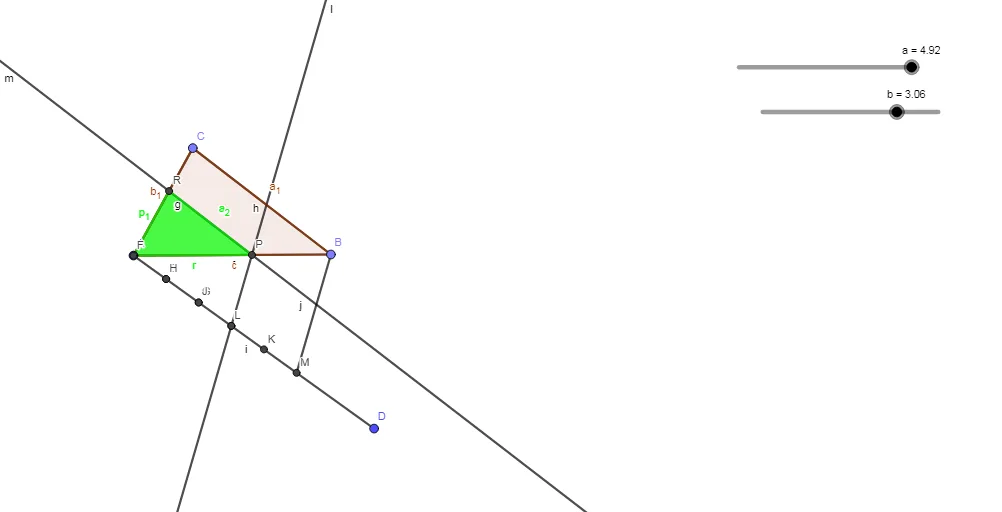
This example demonstrates how to construct a triangle similar to a given one by locating corresponding vertices through a sequence of geometric constructions. It focuses on the properties of similar triangles—equal corresponding angles and proportional corresponding sides—and shows how coordinate-based placement can be achieved through precise intersections. The construction is built with GeoGebra commands including Point, Segment, Polygon, Circle, Intersect, and Line: key points are created, circles are used to generate candidate loci, Intersect determines intersection points that become the vertices of the similar triangle, and Line/Segment/Polygon assemble the final triangle and its supporting structure. The activity is suitable for secondary school geometry and early undergraduate coordinate geometry, especially for lessons on geometric construction, similarity proofs, and interactive verification.
GeoGebra Commands & Parameters
Point(Circle[A, a]) → BSegment(A, B) → fPoint(Circle[A, b]) → CSegment(A, C) → gSegment(C, B) → hPolygon(C, A, B) → t1, b_1, c, a_1Segment(A, D) → iCircle(A, 1) → dIntersect(d, i) → E,Circle(E, 1) → eIntersect(e, i) → F, GCircle(G, 1) → kIntersect(k, i) → H, ICircle(I, 1) → pIntersect(p, i) → J, KCircle(K, 1) → qIntersect(q, i) → L, MSegment(B, M) → jLine(I, j) → lIntersect(f, c) → NIntersect(l, t1) → O, PLine(P, h) → mIntersect(g, b_1) → QIntersect(m, g) → RPolygon(R, A, P) → t2, p_1, r, a_2
AI Drawing Prompt Reference
Construct a triangle similar to a given one. Start by creating key points A, B, C using circles and points, then form triangle ABC with line segments. Next, find additional points D, E, F, G, H, I, J, K, L, M using circles and intersections, and finally connect these points to form the similar triangle RPA.
The prompt above was compiled from the original drawing commands and is for reference only.