
Trapezoid Maker by Melanie Palma
Loading the math board and drawing, please wait…
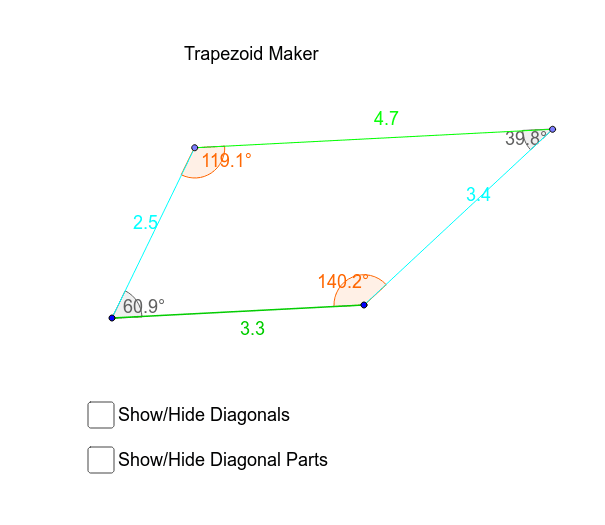
This example demonstrates how to dynamically construct a trapezoid and its related properties. It involves core mathematical concepts such as polygon construction, angle measurement, segment length calculation, and rotational transformations. Key GeoGebra commands used include Line, Segment, Point, Angle, Rotate, and Intersect to create trapezoid vertices, edges, and angles, with Rotate enabling symmetry for isosceles trapezoids. Suitable for middle school and above students learning geometric constructions, trapezoid properties, and transformation applications.
GeoGebra Commands & Parameters
Line(P, A) → aLine(E, a) → bSegment(A, P) → gPoint(b) → TPoint(b) → RSegment(T, R) → cSegment(P, T) → dSegment(R, A) → eAngle(A, P, T) → αAngle(P, T, R) → βAngle(T, R, A) → γAngle(R, A, P) → δLine(L, C) → a_1Line(E_1, a_1) → b_1Segment(C, L) → g_1Point(b_1) → ISegment(L, I) → d_1Angle(C, L, I) → α_1Rotate(L, (-α_1), C) → BAngle(B, C, L) → εSegment(C, B) → fIntersect(b_1, f) → SSegment(C, S) → hSegment(I, S) → iAngle(C, S, I) → ζAngle(S, I, L) → ηSegment(P, R) → diag_1Segment(T, A) → diag_2Intersect(diag_1, diag_2) → DSegment(T, D) → diag_2aSegment(D, A) → diag_2bSegment(R, D) → diag_1aSegment(D, P) → diag_1b
AI Drawing Prompt Reference
Draw a trapezoid with two parallel bases and two unequal non-parallel sides. Start by drawing a line segment AB as the base, then take a point P on AB and draw a perpendicular line segment CP. Next, take a point E on the extension of AB and draw a line segment DE parallel to AB. Then, rotate line segment DE around point P to form a trapezoid. Finally, add the diagonals and related angles through rotation and intersection calculations.
The prompt above was compiled from the original drawing commands and is for reference only.