
Isosceles Trapezoid Maker
Loading the math board and drawing, please wait…
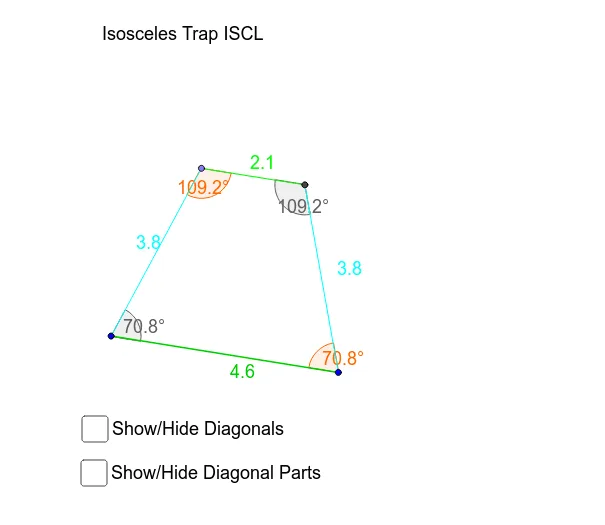
This example demonstrates the dynamic construction of an isosceles trapezoid and its related geometric elements. Key math concepts include polygons, area calculation, central symmetry, and angle relationships. Construction highlights involve commands like Line, Segment, Point, Angle, Rotate, and Intersect to form bases, apexes, height, diagonals, and vertex rotations. Suitable for high school mathematics education to explore properties and transformations of isosceles trapezoids.
GeoGebra Commands & Parameters
Line(P, A) → aLine(E, a) → bSegment(A, P) → gPoint(b) → TPoint(b) → RSegment(T, R) → cSegment(P, T) → dSegment(R, A) → eAngle(A, P, T) → αAngle(P, T, R) → βAngle(T, R, A) → γAngle(R, A, P) → δLine(L, C) → a_1Line(E_1, a_1) → b_1Segment(C, L) → g_1Point(b_1) → ISegment(L, I) → d_1Angle(C, L, I) → α_1Rotate(L, (-α_1), C) → BAngle(B, C, L) → εSegment(C, B) → fIntersect(b_1, f) → SSegment(C, S) → hSegment(I, S) → iAngle(C, S, I) → ζAngle(S, I, L) → ηSegment(P, R) → diag_1Segment(T, A) → diag_2Intersect(diag_1, diag_2) → DSegment(T, D) → diag_2aSegment(D, A) → diag_2bSegment(R, D) → diag_1aSegment(D, P) → diag_1bSegment(I, C) → diagi_1Segment(S, L) → diagi_2Intersect(diagi_1, diagi_2) → FSegment(S, F) → diagi_2aSegment(F, L) → diagi_2bSegment(I, F) → diagi_1aSegment(C, F) → diagi1_b
AI Drawing Prompt Reference
Draw an isosceles trapezoid, labeling its two bases, apexes, and height. Illustrate the diagonals and their intersection point. From the intersection point, draw two additional lines extending to the bases, and from the apexes, draw two more lines to the bases. Label all diagonals clearly.
The prompt above was compiled from the original drawing commands and is for reference only.