
Trapezium Properties Investigation by karabarmaths
Loading the math board and drawing, please wait…
In collections
Parallelogram
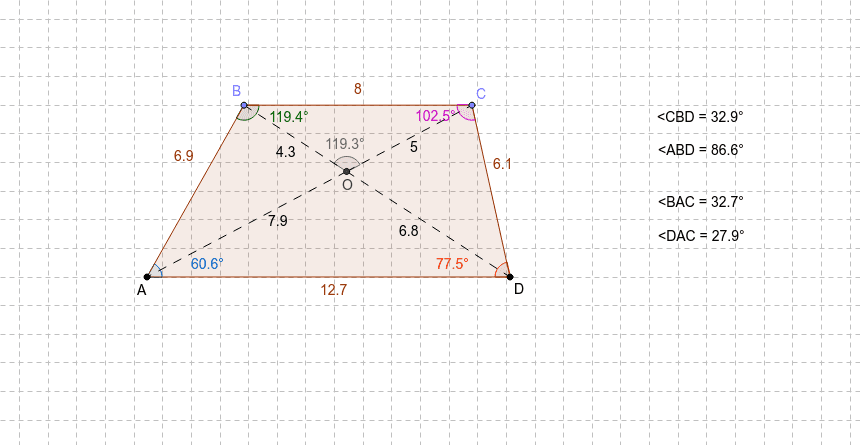
This example demonstrates the properties of a trapezium, including side lengths, angle relationships, and area calculations. Key math concepts involved are polygons, angles, coordinate geometry, and geometric construction. It is constructed using commands like Segment, Line, Point, Polygon, Angle, Intersect, Midpoint, and objects such as angles and midpoints. Suitable for high school mathematics teaching or self-study to understand trapezium geometric characteristics and construction methods.
GeoGebra Commands & Parameters
Segment(A, D) → aLine(C_1, a) → bPoint(b) → D_1Segment(C_1, D_1) → cPoint(c) → EPoint(c) → FSegment(C_1, E) → dSegment(F, D_1) → eSegment(E, F) → fPoint(d) → BPoint(e) → CPolygon(A, B, C, D) → P, a_1, g, h, b_1Angle(A, B, C) → αAngle(D, A, B) → βAngle(B, C, D) → γAngle(C, D, A) → δSegment(B, D) → iSegment(C, A) → jIntersect(i, j) → OSegment(B, O) → kSegment(O, D) → lSegment(O, C) → mSegment(O, A) → nAngle(C, O, B) → εMidpoint(A, D) → GAngle(O, B, C) → ζSegment(A_1, D_2) → a_2Line(C_2, a_2) → b_2Point(b_2) → D_3Segment(C_2, D_3) → c_1Point(c_1) → E_1Point(c_1) → F_1Segment(C_2, E_1) → d_1Segment(F_1, D_3) → e_1Segment(E_1, F_1) → f_1Point(d_1) → B_1Point(e_1) → C_3Polygon(A_1, B_1, C_3, D_2) → P_1, a_3, g_1, h_1, b_3Segment(B_1, D_2) → i_1Segment(C_3, A_1) → j_1Intersect(i_1, j_1) → O_1Segment(B_1, O_1) → k_1Segment(O_1, D_2) → l_1Segment(O_1, C_3) → m_1Segment(O_1, A_1) → n_1Midpoint(A_1, D_2) → G_1Angle(O, B, A) → ζ_1Segment(A_2, D_4) → a_4Line(C_4, a_4) → b_4Point(b_4) → D_5Segment(C_4, D_5) → c_2Point(c_2) → E_2Point(c_2) → F_2Segment(C_4, E_2) → d_2Segment(F_2, D_5) → e_2Segment(E_2, F_2) → f_2Point(d_2) → B_2Point(e_2) → C_5Polygon(A_2, B_2, C_5, D_4) → P_2, a_5, g_2, h_2, b_5Segment(B_2, D_4) → i_2Segment(C_5, A_2) → j_2Intersect(i_2, j_2) → O_2Segment(B_2, O_2) → k_2Segment(O_2, D_4) → l_2Segment(O_2, C_5) → m_2Segment(O_2, A_2) → n_2Midpoint(A_2, D_4) → G_2Segment(A_3, D_6) → a_6Line(C_6, a_6) → b_6Point(b_6) → D_7Segment(C_6, D_7) → c_3Point(c_3) → E_3Point(c_3) → F_3Segment(C_6, E_3) → d_3Segment(F_3, D_7) → e_3Segment(E_3, F_3) → f_3Point(d_3) → B_3Point(e_3) → C_7Polygon(A_3, B_3, C_7, D_6) → P_3, a_7, g_3, h_3, b_7Segment(B_3, D_6) → i_3Segment(C_7, A_3) → j_3Intersect(i_3, j_3) → O_3Segment(B_3, O_3) → k_3Segment(O_3, D_6) → l_3Segment(O_3, C_7) → m_3Segment(O_3, A_3) → n_3Midpoint(A_3, D_6) → G_3Segment(A_4, D_8) → a_8Line(C_8, a_8) → b_8Point(b_8) → D_9Segment(C_8, D_9) → c_4Point(c_4) → E_4Point(c_4) → F_4Segment(C_8, E_4) → d_4Segment(F_4, D_9) → e_4Segment(E_4, F_4) → f_4Point(d_4) → B_4Point(e_4) → C_9Polygon(A_4, B_4, C_9, D_8) → P_4, a_9, g_4, h_4, b_9Segment(B_4, D_8) → i_4Segment(C_9, A_4) → j_4Intersect(i_4, j_4) → O_4Segment(B_4, O_4) → k_4Segment(O_4, D_8) → l_4Segment(O_4, C_9) → m_4Segment(O_4, A_4) → n_4Midpoint(A_4, D_8) → G_4Angle(B, A, C) → ηAngle(C, A, D) → θ
AI Drawing Prompt Reference
Draw a trapezium to demonstrate its side lengths, angle relationships, and area calculations. Start by sketching the four sides of the trapezium, then mark the angles at each vertex. Calculate the intersection point of the diagonals. Next, draw perpendiculars from the intersection point to each side and mark the midpoints. Finally, draw the diagonals and show the angle relationships formed by the intersection point with the vertices.
The prompt above was compiled from the original drawing commands and is for reference only.