
Exploring Square Properties by karabarmaths
Loading the math board and drawing, please wait…
In collections
Parallelogram
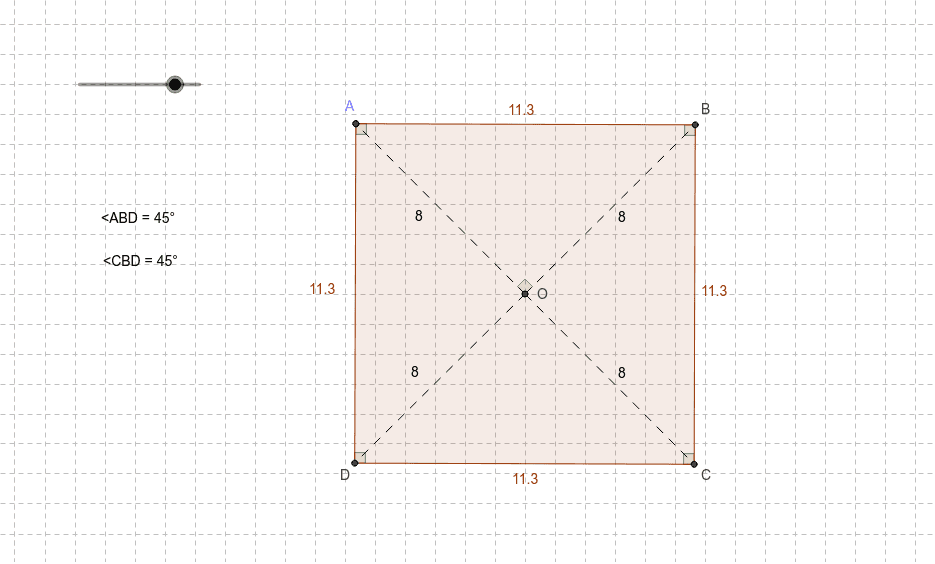
This example demonstrates the geometric properties of a square through interactive exploration, allowing users to observe its side lengths, angles, diagonals, and other characteristics. Key math concepts involved include polygons, angles, rotation, and geometric transformations. The construction utilizes GeoGebra commands such as Intersect, Circle, Point, Line, Rotate, Angle, Polygon, and Segment. It is suitable for middle school and above students to understand the fundamental attributes and transformation rules of squares.
GeoGebra Commands & Parameters
Intersect(xAxis, yAxis) → OCircle(O, r) → cPoint(c) → AIntersect(c, xAxis) → B_1, C_1Intersect(c, yAxis) → E, FLine(A, O) → aIntersect(c, a) → G, CRotate(A, 270*°, O) → IAngle(I, O, A) → αLine(I, O) → bIntersect(c, b) → B, DPolygon(D, A, B, C) → P, k, d, j, hSegment(A, C) → eSegment(D, B) → fAngle(B, O, A) → βSegment(O, A) → gSegment(O, C) → iSegment(O, B) → lSegment(O, D) → mAngle(D, A, B) → γAngle(A, B, C) → δAngle(B, C, D) → εAngle(C, D, A) → ζAngle(A, B, O) → ηAngle(O, B, C) → θ
AI Drawing Prompt Reference
Draw a square with its center, vertices, sides, and angles labeled. Start by drawing a circle centered at the origin, marking its intersections with the axes as vertices. Connect the center to one vertex, rotate this line 270 degrees to find the next vertex, and continue to find all four vertices. Connect these vertices to form the square, and draw its diagonals. Label all interior and central angles to demonstrate the square's symmetry and angle relationships.
The prompt above was compiled from the original drawing commands and is for reference only.