
Properties of a Rectangle by karabarmaths
Loading the math board and drawing, please wait…
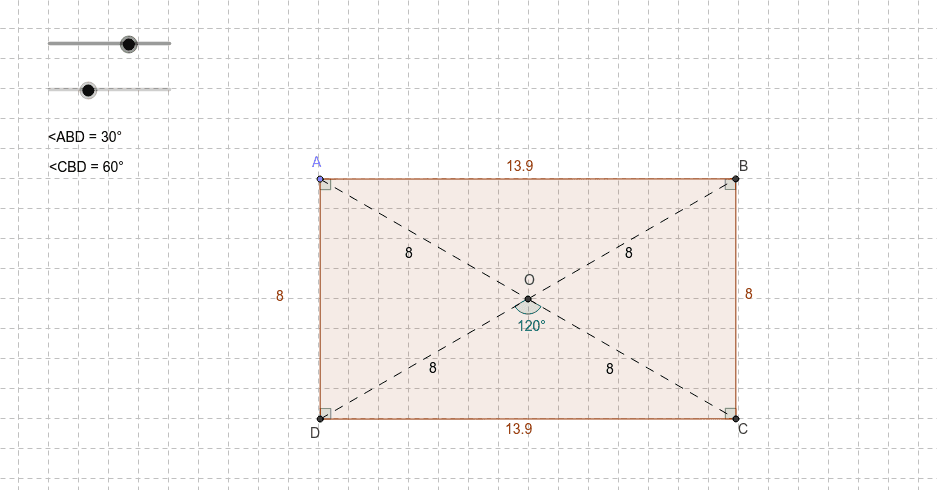
This example demonstrates the properties of a rectangle. Key mathematical concepts include the definition of a rectangle, properties of diagonals, and angle relationships. It uses GeoGebra commands such as Intersect, Circle, Point, and Line for geometric construction. Suitable for middle school and above students or teachers.
GeoGebra Commands & Parameters
Intersect(xAxis, yAxis) → OCircle(O, r) → cPoint(c) → ALine(A, O) → aIntersect(c, a) → B_1, CRotate(C, α, O) → BAngle(C, O, B) → βLine(B, O) → bIntersect(c, b) → E, DPolygon(A, D, C, B) → P, a_1, f, c_1, dSegment(A, O) → eSegment(O, C) → gSegment(D, O) → hSegment(O, B) → iAngle(D, A, B) → γAngle(C, D, A) → δAngle(A, B, C) → εAngle(B, C, D) → ζAngle(D, O, C) → ηAngle(A, B, D) → θAngle(D, B, C) → ι
AI Drawing Prompt Reference
Draw a rectangle with its two diagonals and the angles at each corner. Start by drawing the origin O and the x-axis and y-axis, then draw a circle c centered at O. Pick a point A on circle c, draw a vertical line a from A to the x-axis, and find the intersection points B1 and C with circle c. Rotate point C to get point B, then draw lines OC and OB, and find the intersection points D and E with circle c. Connect points A, D, C, and B to form the rectangle P, and label the angles β, γ, δ, ε, ζ, η, θ, and ι.
The prompt above was compiled from the original drawing commands and is for reference only.