
Geometric construction to visualize ellipse-related and correlation-driven const
Loading the math board and drawing, please wait…
In collections
geometriadinamica.es
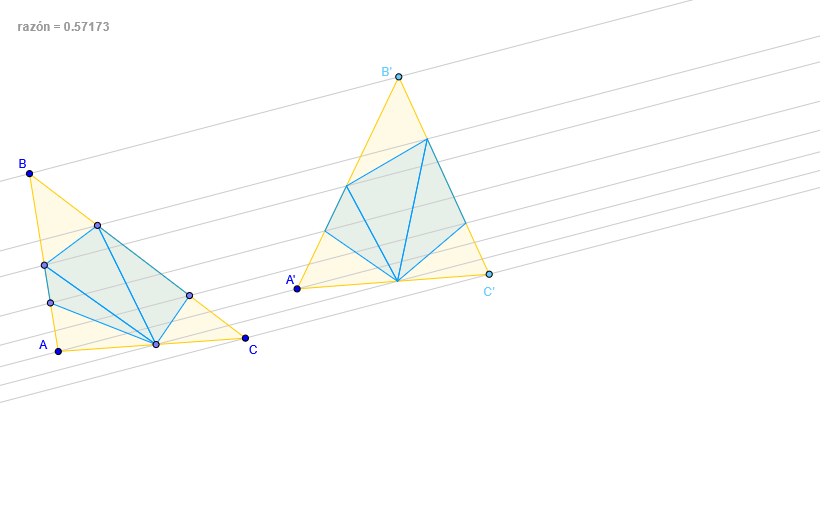
This example demonstrates a geometry-first workflow for building the key constraints behind ellipse-related settings by using explicit constructions. It focuses on how polygonal and line-based constructions, together with angle bisectors and intersection points, can assemble the geometric structure needed for analyzing correlation-style relationships and for setting up optimization-oriented configurations. The underlying mathematics centers on ellipse (Elipse) geometry, correlation (Correlación) as a geometric constraint, and optimization problem patterns (Problemas de Optimización) where geometric parameters can guide interpretation; it also aligns with contexts involving logarithms (Logaritmo) and stochastic/random processes (Procesos estocásticos o aleatorios) by representing parameter dependencies through constructed elements. Construction highlights in GeoGebra: Polygon to form composite polygonal regions, Point to define anchor vertices, Line to create supporting lines, AngularBisector to obtain angle-bisector lines that impose symmetry/constraint structure, and Intersect to compute derived points from crossings. The workflow creates and uses labeled base objects (e.g., A, B, C) and their related points (A′, B′, C′), then computes crucial nodes (e.g., points such as P, R, S) to complete the framework. Suitable for advanced secondary students and early undergraduate learners for geometry construction, analytic geometry, and visualization in mathematical modeling.
GeoGebra Commands & Parameters
Polygon(A, B, C) → poly1, c, a, bPoint(c) → FPoint(a) → EPoint(c) → PPoint(a) → RPoint(b) → SPolygon(R, E, S) → poly8, s_3, r_2, e_1Polygon(P, F, S) → poly7, s_2, p_2, f_1Polygon(P, R, S) → poly3, s_1, p_1, r_1Line(A, A') → dLine(B, d) → fLine(S, f) → iLine(P, f) → hLine(R, f) → gLine(C, d) → eAngularBisector(e, f) → q,Point(f) → B'Point(e) → C'Polygon(A', B', C') → poly2, c', a', b'Intersect(b', i) → S'Intersect(c', h) → P'Intersect(a', g) → R'Polygon(P', R', S') → poly4, s', p', r'Line(F, f) → kLine(E, k) → lIntersect(c', k) → GIntersect(a', l) → KPolygon(R', K, S') → poly9, s'_1, r'_1, k_1Polygon(P', G, S') → poly10, s'_2, p'_1, g_1
AI Drawing Prompt Reference
Draw a geometric figure related to ellipses, containing multiple polygons, line segments, angle bisectors, and intersection points. First, draw a large polygon containing several key points and line segments. Then, draw several smaller polygons within the large polygon, containing some important points and line segments. Next, draw some line segments and angle bisectors connecting these points and line segments. Finally, draw some intersection points and smaller polygons to complete the entire figure.
The prompt above was compiled from the original drawing commands and is for reference only.