
Rectangle with Distances and Area Exploration
Loading the math board and drawing, please wait…
In collections
Parallelograms Investigation
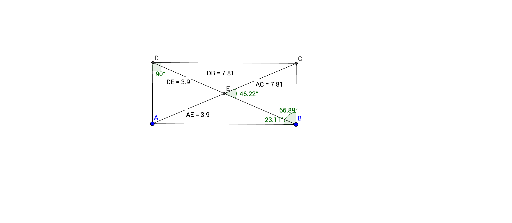
①This GeoGebra example dynamically constructs a rectangle and displays its diagonals, mid-segment connections, and related distance labels, visually demonstrating fundamental properties of rectangles. ②Core mathematical concepts include the definition of a rectangle, diagonal properties, mid-segment (midline) relationships, and distance measurement, along with area and algebraic calculations (e.g., numerical distance displays). ③Construction details: Segment creates sides, OrthogonalLine ensures right angles, Line and Intersect determine vertices, Angle marks right angles, Distance measures segment lengths, Midpoint generates midpoints, and Text objects display distance values (distanceDB, distanceDE, distanceAE, distanceAC), integrating algebra and geometry to show relationships among segments. ④Suitable for middle school geometry teaching or high school analytic geometry introduction, useful for classroom demonstrations of rectangle properties, distance calculations, and dynamic exploration, as well as for student self-directed learning.
GeoGebra Commands & Parameters
Segment(A, B) → fOrthogonalLine(B, f) → gOrthogonalLine(A, f) → hLine(C_1, f) → iIntersect(h, i) → DIntersect(g, i) → CSegment(D, C) → jSegment(C, B) → kSegment(A, D) → lSegment(D, B) → mSegment(A, C) → nIntersect(m, n) → EAngle(A, D, C) → αAngle(E, B, A) → βAngle(B, E, C) → γAngle(C, B, E) → δDistance(D, B) → distanceDBDistance(D, E) → distanceDEMidpoint(D, E) →Distance(A, E) → distanceAEMidpoint(A, E) →Distance(A, C) → distanceACMidpoint(A, C) →
AI Drawing Prompt Reference
Draw a rectangle by first creating a base segment, then constructing perpendicular lines at both endpoints to form vertical sides, and connecting the top endpoints to complete the shape. Label all four vertices, draw both diagonals intersecting at the center, and mark right angles at each vertex. Measure and display the lengths of the diagonals, the distances from the center to each vertex, and the distances between the base endpoints and the center. Also mark the midpoints of the sides and show relevant distance values to illustrate that the diagonals are equal and bisect each other.
The prompt above was compiled from the original drawing commands and is for reference only.