
Translation and Rotation of Geometric Figures
Loading the math board and drawing, please wait…
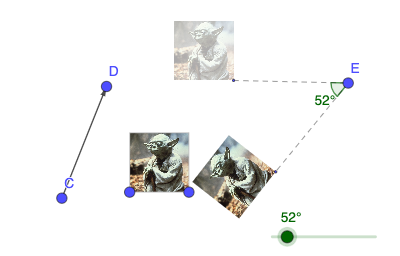
This GeoGebra example demonstrates how to perform translation and rotation transformations on geometric figures. It shows: ①Using the Vector command to define the direction and distance of translation, then applying the Translate command; ②Using the Angle command to define rotation amount, then applying the Rotate command. Key commands used: Vector (creates translation vector), Translate (performs translation), Rotate (performs rotation), Segment (draws line segments), Angle (defines angles). This is ideal for middle school mathematics units on geometric transformations, useful for demonstrating properties of translation and rotation, understanding that transformations preserve size and shape, and exploring relationships between rotation center and rotation angle. An excellent interactive resource for teaching geometric transformations.
GeoGebra Commands & Parameters
Vector(C, D) → uTranslate(pic1, u) → pic1'Rotate(pic1', a, E) → pic1''Translate(B, u) → B'Rotate(B', a, E) → B''Segment(B', E) → fSegment(E, B'') → gAngle(B', E, B'') → α
AI Drawing Prompt Reference
Draw a figure that includes a line segment and a point. The line segment starts from the point, then rotates by an angle, and then translates by the same vector. Ensure the figure maintains its size and shape, showing the relationship between rotation and translation.
The prompt above was compiled from the original drawing commands and is for reference only.