
Transformations Exercise 3: Graphic Transformations
Loading the math board and drawing, please wait…
In collections
Transformations/Symmetry
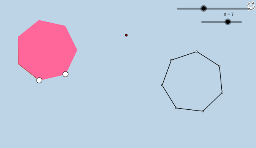
This example demonstrates the concept of graphic transformations, involving core mathematical concepts such as vectors and rotation. Using GeoGebra commands like Line, Ray, Point, Polygon, Rotate, etc., the transformed graphics can be constructed. Suitable for middle school students to learn about geometric transformations.
GeoGebra Commands & Parameters
Line(A, B) → fRay(A, B) → gPoint(f) → PPoint(f) → QPolygon(A, B, n) → poly1, h, C, D, E, F, H, I, J, i, j, k, l, m, p, q, rRotate(poly1, α, G) → poly1'Vertex(poly1') → K, L, M, N, O, R, K_1, K_2, K_3Segment(M, L) → sSegment(L, K) → tSegment(K, R) → aSegment(R, O) → bSegment(O, N) → cSegment(N, M) → dSegment(N, K) → eSegment(M, K) → f_1Segment(K, O) → g_1Segment(R, K_1) → h_1Segment(K_1, K) → i_1Segment(K_1, K_2) → j_1Segment(K_2, K) → k_1Segment(K_2, K_3) → l_1Segment(K_3, K) → m_1
AI Drawing Prompt Reference
Draw a line segment and a ray starting from the same point. Take two points on the line segment and connect them with the endpoint of the ray to form a polygon. Rotate this polygon around a point by a certain angle to get a new polygon. Connect the diagonals of the new polygon to form several small triangles and label the segments and points.
The prompt above was compiled from the original drawing commands and is for reference only.