
Tracing the Cone: Intersections and Ellipse/Uncertainty Demo
Loading the math board and drawing, please wait…
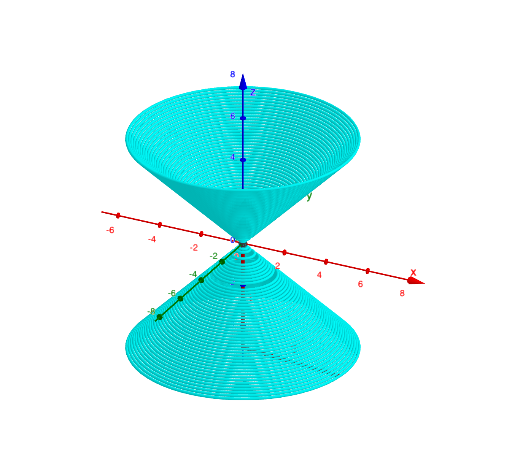
This example demonstrates how to “trace” cone-related structures by chaining geometric constructions: it visualizes how key points and curves arise from successive intersections along a constructed path. The core ideas include solid-geometry cone sections, the emergence of ellipse-like curves from cone geometry, and the way uncertainty-style intervals (confidence-interval and conditional-probability concepts) can be represented using point sets and bounded regions. Construction is driven by the GeoGebra commands in the build: IntersectPath to create the tracing path (objects such as a, b, c, d, f, p), Point to define critical points (e.g., A, B, C and derived points), Intersect to compute intersection relationships (using constraints/equations like eq1 and objects such as k, g), and Segment to form bounded line segments used in the intersection steps (objects including A, B, f, C). The result is a clear, interactive workflow from intersecting geometry to a traced curve/region. Suitable for late secondary school through early university, especially for lessons on solid geometry, geometric construction, and linking geometry with statistics-style interval visualization.
GeoGebra Commands & Parameters
IntersectPath(p, eq1) → dPoint(d) → AIntersect(zAxis, p) → BSegment(A, B) → fIntersect(yAxis, xAxis) → CSegment(C, B) → g
AI Drawing Prompt Reference
Draw a curve formed by a cone's cross-section, showing how continuous geometric constructions lead to an ellipse-like shape. Key points include the cone's vertex, points on the axis, and connecting lines. The construction order starts from the cone's vertex, moves along the axis, and then uses intersections to form the curve. The graphic should clearly show these geometric relationships and the process of curve formation.
The prompt above was compiled from the original drawing commands and is for reference only.