
Tracing Double Box-lid (Mouhefanggai)
Loading the math board and drawing, please wait…
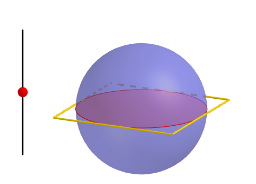
This example demonstrates the construction and tracing of a double box-lid (Mouhefanggai) using GeoGebra. It involves core mathematical concepts such as sphere, volume, percentages, piecewise functions, multiplication, sequences and series, and indefinite integral. The construction utilizes commands like Sequence, Sphere, Segment, Point, OrthogonalPlane, IntersectPath, Line, Intersect, Distance, Circle, and Polygon. It is suitable for high school and above students to explore complex geometric solids and the relationship between function graphs and parameterized modeling.
GeoGebra Commands & Parameters
Sequence((-2, 0, i), i, 0, 2, 2 / n) → list1Sphere((0, 0, 1), 1) → jSegment((-2, 0, 0), (-2, 0, 2)) → fPoint(list1) → POrthogonalPlane(P, f) → aIntersectPath(a, j) → cLine(C, xAxis) → gIntersect(g, j) → D, EDistance(C, E) → rSegment(F, G) → hSegment(G, H) → iSegment(H, I) → kSegment(I, F) → lCircle((0, 0), r) → dPolygon(((-r), (-r)), (r, (-r)), (r, r), ((-r), r)) → poly1, m, p, q, s
AI Drawing Prompt Reference
Draw a double box-lid (Mouhefanggai). Start by drawing a sphere with a radius of 1, then draw a line segment on the x-axis, followed by drawing a plane perpendicular to this line segment on the sphere, intersecting to form a circle. Draw another circle centered at the origin with a radius equal to the circle's radius, and finally use these circles and line segments to form a quadrilateral.
The prompt above was compiled from the original drawing commands and is for reference only.