
Town of Iceberg: Visualizing a Minimum Dominating Set
Loading the math board and drawing, please wait…
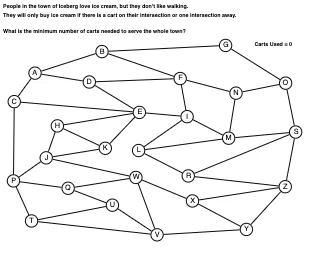
This example demonstrates, via a geometric point-and-edge layout, how to find a minimum dominating set that “covers” every vertex according to the induced adjacency/coverage rules. The key ideas are graph-theoretic minimum dominating sets and optimization (minimizing the number of selected vertices), with geometry providing an intuitive representation of neighbor relations. Construction highlights in GeoGebra include using Segment to draw the edge structure between points, Circle to define the coverage/selection region (a radius or neighborhood test), CountIf to count how many vertices meet the domination condition, and Text to label important points or the resulting set size. From the provided construction summary, it uses commands Segment, Circle, Text, and CountIf, along with multiple point objects (A through Z, plus Xpoint and Ypoint) and the generated segment objects (e.g., AC, AD, AB, BF, BG, etc.) that represent the underlying adjacency used to evaluate domination. Suitable for later secondary school and early university contexts in graph theory and discrete optimization, and for interactive exploration in GeoGebra.
GeoGebra Commands & Parameters
Segment(A, C) → ACSegment(A, D) → ADSegment(A, B) → ABSegment(B, F) → BFSegment(B, G) → BGSegment(C, E) → CESegment(C, P) → CPSegment(D, F) → DFSegment(D, E) → DESegment(E, H) → EHSegment(E, K) → EKSegment(E, I) → EISegment(F, I) → FISegment(F, N) → FNSegment(G, O) → GOSegment(H, J) → HJSegment(H, K) → HKSegment(I, L) → ILSegment(I, M) → IMSegment(J, K) → JKSegment(J, P) → JPSegment(J, W) → JWSegment(L, M) → LMSegment(L, R) → LRSegment(M, N) → MNSegment(M, S) → MSSegment(N, O) → NOSegment(O, S) → OSSegment(P, T) → PTSegment(P, Q) → PQSegment(Q, U) → QUSegment(Q, W) → QWSegment(R, Z) → RZSegment(R, S) → RSSegment(S, Z) → SZSegment(T, U) → TUSegment(T, V) → TVSegment(U, V) → UVSegment(V, W) → VWSegment(V, Ypoint) → VYSegment(W, Xpoint) → WXSegment(Xpoint, Z) → XZSegment(Xpoint, Ypoint) → XYSegment(Z, Ypoint) → YZCountIf(x ≟ true, listOfCarts) → numCartsCircle(A, 0.35) → borderACircle(B, 0.35) → borderBCircle(C, 0.35) → borderCCircle(D, 0.35) → borderDCircle(E, 0.35) → borderECircle(F, 0.35) → borderFCircle(G, 0.35) → borderGCircle(H, 0.35) → borderHCircle(I, 0.35) → borderICircle(J, 0.35) → borderJCircle(K, 0.35) → borderKCircle(L, 0.35) → borderLCircle(M, 0.35) → borderMCircle(N, 0.35) → borderNCircle(O, 0.35) → borderOCircle(P, 0.35) → borderPCircle(Q, 0.35) → borderQCircle(R, 0.35) → borderRCircle(S, 0.35) → borderSCircle(T, 0.35) → borderTCircle(U, 0.35) → borderUCircle(V, 0.35) → borderVCircle(W, 0.35) → borderWCircle(Xpoint, 0.35) → borderXCircle(Ypoint, 0.35) → borderYCircle(Z, 0.35) → borderZCircle(A, 0.35) → fillACircle(B, 0.35) → fillBCircle(C, 0.35) → fillCCircle(D, 0.35) → fillDCircle(E, 0.35) → fillECircle(F, 0.35) → fillFCircle(G, 0.35) → fillGCircle(H, 0.35) → fillHCircle(I, 0.35) → fillICircle(J, 0.35) → fillJCircle(K, 0.35) → fillKCircle(L, 0.35) → fillLCircle(M, 0.35) → fillMCircle(N, 0.35) → fillNCircle(O, 0.35) → fillOCircle(P, 0.35) → fillPCircle(Q, 0.35) → fillQCircle(R, 0.35) → fillRCircle(S, 0.35) → fillSCircle(T, 0.35) → fillTCircle(U, 0.35) → fillUCircle(V, 0.35) → fillVCircle(W, 0.35) → fillWCircle(Xpoint, 0.35) → fillXCircle(Ypoint, 0.35) → fillYCircle(Z, 0.35) → fillZText("S", S - (0.1, 0.1)) → vertexSText("A", A - (0.15, 0.1)) → vertexAText("B", B - (0.14, 0.1)) → vertexBText("C", C - (0.15, 0.1)) → vertexCText("D", D - (0.16, 0.1)) → vertexDText("E", E - (0.12, 0.1)) → vertexEText("F", F - (0.12, 0.1)) → vertexFText("G", G - (0.15, 0.1)) → vertexGText("H", H - (0.16, 0.1)) → vertexHText("I", I - (0.06, 0.1)) → vertexIText("J", J - (0.08, 0.1)) → vertexJText("K", K - (0.14, 0.1)) → vertexKText("L", L - (0.12, 0.1)) → vertexLText("M", M - (0.17, 0.1)) → vertexMText("N", N - (0.16, 0.1)) → vertexNText("O", O - (0.17, 0.1)) → vertexOText("P", P - (0.14, 0.1)) → vertexPText("Q", Q - (0.17, 0.1)) → vertexQText("R", R - (0.14, 0.1)) → vertexRText("T", T - (0.14, 0.1)) → vertexTText("U", U - (0.15, 0.1)) → vertexUText("V", V - (0.14, 0.1)) → vertexVText("W", W - (0.17, 0.1)) → vertexWText("X", Xpoint - (0.14, 0.1)) → vertexXText("Y", Ypoint - (0.14, 0.1)) → vertexYText("Z", Z - (0.14, 0.1)) → vertexZ
AI Drawing Prompt Reference
Place a set of labeled vertices on the plane (using the available letter points A–Z plus the points Xpoint and Ypoint, along with P, Q, R, S, T, U, V, W, and Z as given). Draw straight segments to form the adjacency/edge structure, explicitly connecting A to C, D, and B, B to F and G, C to E and P, and then continue connecting the remaining points according to the provided pairs. Add circles centered at A, B, and C with radius 0.35 to illustrate the coverage neighborhood around these vertices. Include text/annotation where needed to support counting how many vertices satisfy the domination/coverage condition.
The prompt above was compiled from the original drawing commands and is for reference only.