
Greedy Pollen Collection: 3D Vectors, Angles, and Optimization
Loading the math board and drawing, please wait…
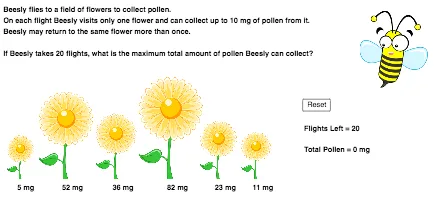
This GeoGebra example visualizes a “pollen collection” scenario to demonstrate that, under the model’s rules, a greedy strategy can lead to an optimal or improved outcome. It centers on core ideas from optimization: representing decisions as contributions computed from 3D vectors, using angle measures to quantify direction/cost, and comparing objectives such as maximum collected pollen (maxPollen) versus number of flights (numFlights / maxFlights). The construction uses GeoGebra objects like pollenFlower1–pollenFlower6 and totalPollen to accumulate results, maxPollen and maxFlights to track best values, results/N/O to display outcomes, and Text-based instruction/result labels (instructions, text1–text5) for guided learning. Interactive flow is supported with objects including collect and Reset, while labeled points and variables (A–D, E–L, flower1–flower6) provide the mapping from candidate targets to computed vector/angle-based decisions. Suitable for classroom demonstrations and learning materials on greedy optimization, vector modeling, and visualization of angle-based metrics.
GeoGebra Commands & Parameters
Text(pollenFlower1 + " mg") → text1Text(pollenFlower2 + " mg") → text2Text(pollenFlower3 + " mg") → text3Text(pollenFlower4 + " mg") → text4Text(pollenFlower5 + " mg") → text5Text(pollenFlower6 + " mg") → text6
AI Drawing Prompt Reference
Create a 3D visualization for a “Greedy Pollen Collection” optimization lesson: include multiple target items representing pollen amounts for pollenFlower1 through pollenFlower6, and place text labels next to each flower showing its mg value. Show the accumulation variable totalPollen as the running total, and include value trackers for maxPollen and the best-flight metric such as numFlights / maxFlights. Add clear on-screen instruction text (instructions) and an outcomes/result display area (results with related values) to guide viewers through how 3D vector contributions and angle measures are used to compare objectives and update the best result. Arrange the elements so the mapping from candidate targets to computed vector/angle-based decisions is visually understandable.
The prompt above was compiled from the original drawing commands and is for reference only.