
Proving Angle Relationships for Parallel Lines
Loading the math board and drawing, please wait…
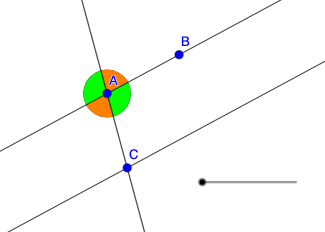
This GeoGebra example demonstrates how to prove and visualize angle relationships created when two parallel lines are cut by a transversal. It focuses on the classic angle results such as corresponding angles, alternate interior angles, and related equalities (often involving supplementary/linear-pair structure). Key concepts include parallel-line properties, angle measurement, and reasoning by congruence/equality of angles. Construction highlights: Line is used to create the parallel lines and the transversal; Intersect finds precise intersection points; Circle and CircleSector provide visible angle arcs and angle markers; Dilate and Translate (with Vector) replicate and reposition geometric elements to compare corresponding angle pairs under a consistent configuration. The objects (e.g., A, B, C, D, E, … and their primed/destination counterparts like A', d', k', e', p'_1) support the dynamic comparison of angles. Suitable for middle/high-school geometry instruction, especially for teaching proof strategies for angle theorems and for exploratory classroom demonstrations.
GeoGebra Commands & Parameters
Line(A, B) → fLine(A, C) → gLine(C, f) → hCircle(A, 1) → cIntersect(c, f, 2) → DIntersect(c, g, 1) → EIntersect(c, f, 1) → FIntersect(c, g, 2) → GDilate(A, 1 - a, C) → A'CircleSector(A, D, E) → dCircleSector(A, E, F) → eCircleSector(A, F, G) → kCircleSector(A, G, D) → pVector(A, A') → uTranslate(d, u) → d'Translate(k, u) → k'Translate(e, u) → e'Translate(p, u) → p'Translate(p, u) → p'_{1}
AI Drawing Prompt Reference
Draw two parallel lines cut by a transversal, forming multiple angles. Key objects include the transversal, parallel lines, intersection points, circles, and circular arcs. The construction order is to draw the parallel lines and transversal first, then use circles and intersection points to find intersection points, and finally mark angles with circular arcs.
The prompt above was compiled from the original drawing commands and is for reference only.