
Puzzletown: A Geometric Example of Minimum Dominating Sets
Loading the math board and drawing, please wait…
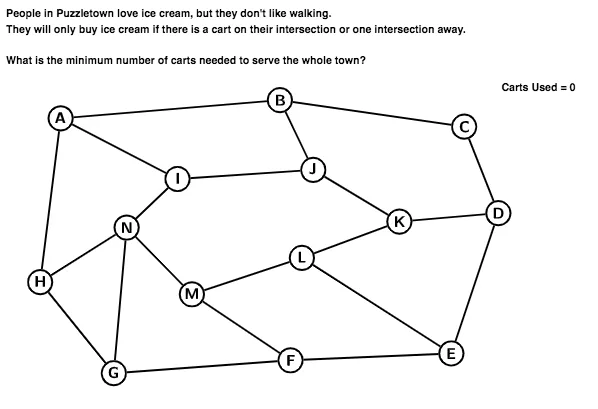
This GeoGebra example demonstrates how to find a minimum dominating set on a planar graph-like configuration by selecting points so that every point is either chosen or is adjacent to a chosen one. It focuses on the core ideas of dominating sets in graph theory and the optimization goal of minimizing the number of selected vertices. The construction uses geometric primitives—Segment and Circle—to lay out the points and connections (e.g., segments such as AB, DE, JK, LM, MN together with circular/planar regions). It also employs CountIf to count how well a candidate selection covers all vertices via neighborhood relations. Key objects include the point set (A through N), boolean/flag-style selection markers (AisCart, BisCart, …) and neighbor-coverage indicators (AisNeighbour, BisNeighbour, …), enabling interactive evaluation of candidate solutions. Suitable for upper-secondary and undergraduate introductory lessons on optimization, graph concepts, and visualization-based reasoning.
GeoGebra Commands & Parameters
Segment(A, B) → ABSegment(D, E) → DESegment(J, K) → JKSegment(L, M) → LMSegment(M, N) → MNCountIf(x ≟ true, listOfCarts) → numCartsCircle(A, 0.35) → borderACircle(B, 0.35) → borderBCircle(C, 0.35) → borderCCircle(D, 0.35) → borderDCircle(E, 0.35) → borderECircle(F, 0.35) → borderFCircle(G, 0.35) → borderGCircle(H, 0.35) → borderHCircle(I, 0.35) → borderICircle(J, 0.35) → borderJCircle(K, 0.35) → borderKCircle(L, 0.35) → borderLCircle(M, 0.35) → borderMCircle(N, 0.35) → borderNCircle(A, 0.35) → fillACircle(B, 0.35) → fillBCircle(C, 0.35) → fillCCircle(D, 0.35) → fillDCircle(E, 0.35) → fillECircle(F, 0.35) → fillFCircle(G, 0.35) → fillGCircle(H, 0.35) → fillHCircle(I, 0.35) → fillICircle(J, 0.35) → fillJCircle(K, 0.35) → fillKCircle(L, 0.35) → fillLCircle(M, 0.35) → fillMCircle(N, 0.35) → fillNSegment(A, I) → AISegment(A, H) → AHSegment(B, C) → BCSegment(B, J) → BJSegment(C, D) → CDSegment(D, K) → DKSegment(E, F) → EFSegment(E, L) → ELSegment(F, G) → FGSegment(F, M) → FMSegment(G, H) → GHSegment(G, N) → GNSegment(H, N) → HNSegment(I, J) → IJSegment(I, N) → INSegment(K, L) → KL
AI Drawing Prompt Reference
Draw a planar graph-like configuration with fourteen points arranged in clusters, connected by straight segments to form a network. Around each point, place a small circle as a marker. Connect certain pairs of points with lines to show adjacency, such as linking points in a chain or ring. Use distinct colors or fills to indicate selected versus unselected points, making the coverage relationships visually clear. The layout should emphasize the neighborhood structure for evaluating a dominating set.
The prompt above was compiled from the original drawing commands and is for reference only.